

Methodology: built from ServiceNow's implementation guidance, documentation and partner pages, plus G2 reviews, Vendr and itsm.tools, all checked on 1 Oct 2026. No vendor reviewed or paid for this article. We did not run hands-on tests.
A ServiceNow implementation is the project that turns a ServiceNow subscription into a working service desk: processes designed, the instance configured, integrations built, people trained and the platform handed over. ServiceNow's own Now Create method runs it in five phases: Initiate, Plan, Execute, Deliver and Close (ServiceNow, as of 1 Oct 2026).
You have bought ServiceNow, or are about to, and need a plan. This guide covers the phases, ServiceNow's partner program, what drives cost, and the decision most plans leave too late: what happens to the ticket history in the tool you are replacing.
Key takeaways
- ServiceNow's Now Create methodology has five phases (Initiate, Plan, Execute, Deliver, Close), with an exit gate between each (ServiceNow, as of 1 Oct 2026).
- ServiceNow's partner workbook advises shortlisting three to five partners, then two to three finalists (ServiceNow, as of 1 Oct 2026).
- ServiceNow publishes no ITSM prices (ServiceNow, as of 1 Oct 2026), and 59 G2 reviews cite high licensing and implementation costs (G2, as of 1 Oct 2026).
- ServiceNow's playbook lists "Roadmap your migration strategy" as a first-phase ITSM action but gives no method for bringing ticket history across (ServiceNow, as of 1 Oct 2026).
What is a ServiceNow implementation?
A ServiceNow implementation is the project that designs your service processes on the ServiceNow platform, configures a new instance to run them, connects it to your other systems, trains the people who use it and hands it to an internal platform team. Bringing old records in is a separate decision made inside it.
Two related jobs get mixed up with it:
- ServiceNow migration. Moving records into or out of ServiceNow. Our ServiceNow migration guide covers the method, and leaving the platform is covered in ServiceNow to Jira migration.
- Promoting configuration between instances. Update sets capture customizations and exclude transactional task or process data (ServiceNow, as of 1 Oct 2026). Moving from development to production carries configuration, not tickets.
ServiceNow implementation phases
ServiceNow's implementation method, Now Create, is "used across customers, partners, and our own ServiceNow team of experts" and draws on more than 6,234 implementations (ServiceNow, as of 1 Oct 2026). If your partner uses its own method, ask how it maps to these phases.
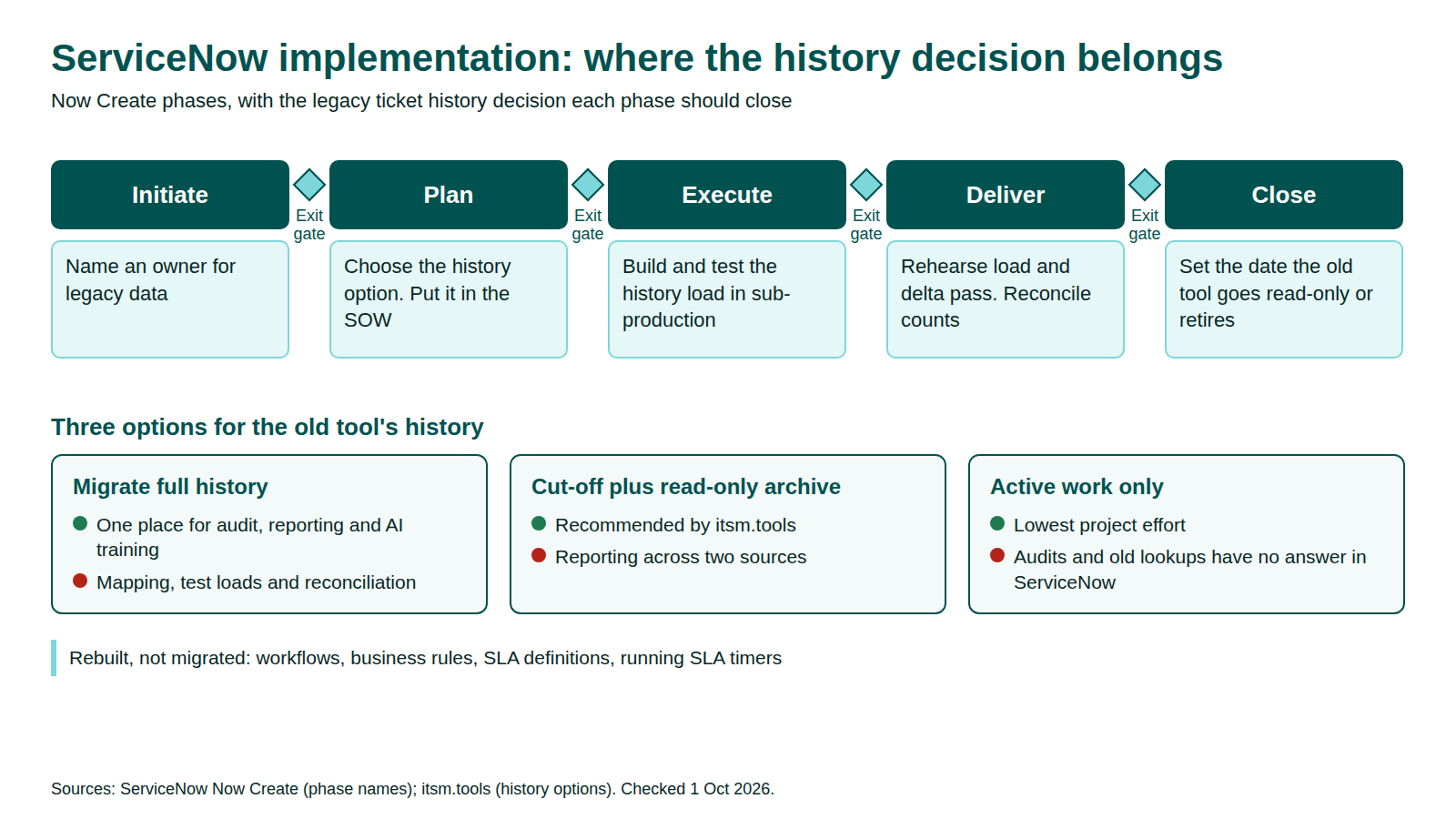
The middle column quotes ServiceNow. The right column is our addition, because none of the phase descriptions mention data.
| Phase | What ServiceNow says happens | The history decision to close here |
|---|---|---|
| Initiate | "Understand the business objectives; establish program governance" | Name an owner for legacy data. Bring audit and reporting owners into governance |
| Plan | "Conduct process, platform, and integration workshops; define, review and prioritize the product backlog" | Choose the history option and put it in the backlog and the statement of work |
| Execute | "Run agile scrum cycles; define support processes and hypercare approach" | Build and test the history load in sub-production alongside configuration |
| Deliver | "System testing and user acceptance testing; go-live planning; operational readiness" | Rehearse the load and the delta pass. Reconcile counts before go/no-go |
| Close | "Operational handover; hypercare support; lessons learned; measure value" | Set the date the old tool becomes read-only or is retired |
Source: ServiceNow, as of 1 Oct 2026.
What ServiceNow's playbook says to get right first
ServiceNow's implementation playbook calls the CMDB "the most critical foundation" and warns that aiming to be comprehensive without good discovery tools is "likely to result in excessive maintenance costs" (ServiceNow, as of 1 Oct 2026). Scope CIs to your first release; our ServiceNow CMDB guide explains the data model.
ServiceNow's essentials workbook adds two rules for your project charter (ServiceNow, as of 1 Oct 2026):
- "Prioritize out-of-the-box (OOTB) options." Excessive customization can "create downstream maintenance costs, increase the testing time required for upgrades, and delay implementation."
- Map current processes first, to avoid "a lift and shift of bad (or incomplete) processes onto the Now Platform."
Someone with authority must enforce both. Like every enterprise migration, an implementation needs a project lead.
Choosing a ServiceNow implementation partner
ServiceNow runs four partner programs: Reseller, Service Provider, Consulting & Implementation, and Build (ServiceNow, as of 1 Oct 2026). Implementation work sits with Consulting & Implementation partners, which the Partner Finder lets you search by keyword and filter by partner type (ServiceNow, as of 1 Oct 2026). We don't rank partners.
ServiceNow's partner strategy workbook sets out the selection steps (ServiceNow, as of 1 Oct 2026):
- Form a cross-functional selection team and scorecard. "Avoid the urge to simply go with the partner that you've worked in past."
- Review the Partner Finder and shortlist "at least three, but no more than five" partners.
- Send an RFP or RFI, then pick "two to three partner candidates for final evaluation."
- Ask for a final proposal with a statement of work (SOW) and pricing, and agree a RACI between the partner and your internal team.
The workbook also asks you to document "legacy systems that you want to replace and/or consolidate." That is the moment to settle history in the SOW. Add these questions to the RFP:
| Question to ask a ServiceNow implementation partner | Why it matters |
|---|---|
| Which of our in-scope products are your consultants certified in? | ServiceNow advises engaging "certified ServiceNow resources with expertise in the products and processes in scope" (ServiceNow, as of 1 Oct 2026) |
| How does your method map to Initiate, Plan, Execute, Deliver and Close? | Exit gates tell you when you can stop or change course |
| Is legacy ticket history in the SOW, and who owns it? | If it is not written down, it is out of scope |
| How will you prove what loaded? | Counts per record type, samples and sign-off. See vetting migration partners beyond SOC 2 |
ServiceNow implementation cost: what drives it
ServiceNow implementation cost is not public. ServiceNow lists ITSM Foundation, Advanced and Prime with a "Get Custom Quote" button and no prices (ServiceNow, as of 1 Oct 2026), and we found no allowed source that prices implementation services. Our ServiceNow pricing guide covers the subscription side.
Vendr, a software buying platform, says "Implementation and professional services often add significantly to annual software spend; budget accordingly." Its median of $129,871 a year across 109 purchases is contract value for all ServiceNow products, not implementation cost (Vendr, as of 1 Oct 2026).
Scope moves the number. Price each line in the SOW:
| Cost driver | Why it adds effort | What to pin down |
|---|---|---|
| Package and products | Change, Problem and Major Incident Management sit in ITSM Advanced, not Foundation (ServiceNow, as of 1 Oct 2026) | Which processes go live in release one |
| CMDB scope | Comprehensive CMDB efforts raise maintenance cost, per the playbook | CI classes tied to release-one use cases |
| Integrations | Each system needs design, build and testing | Which are needed on day one |
| Ticket history | Mapping, test loads and reconciliation are real work | Which history option, in writing |
| Training | Agents, approvers and admins all need it | Who trains whom, and when |
ServiceNow integration work
Integration Hub is ServiceNow's tool to "connect workflows quickly, easily, and securely with any modern API-enabled system," with out-of-the-box spokes (ServiceNow, as of 1 Oct 2026). For custom connections, the Table API supports create, read, update and delete on ServiceNow tables and returns up to 10,000 records per request by default (ServiceNow, as of 1 Oct 2026). Run integrations and the one-time history load as separate workstreams.
Your ticket history: what implementations leave behind
Implementation scope is built around configuration, so the old tool's ticket history is easy to leave out. ServiceNow's playbook does name the task: "Roadmap your migration strategy from your current process and toolset(s) to the Now Platform" for ITSM, and "Migrate or integrate case history" for customer service (ServiceNow, as of 1 Oct 2026). It gives no method for either, so the decision falls to you and your SOW.
Why history matters after go-live
- Audit. itsm.tools, an ITSM analysis site, warns that moving only active work loses the records needed for audits, compliance reviews and past incident lookups (itsm.tools, as of 1 Oct 2026).
- SLA reporting. ServiceNow's SLA repair "uses the history from the Task" (ServiceNow, as of 1 Oct 2026). Tickets imported with only their final state give it little to work with.
- AI. A ServiceNow employee's Predictive Intelligence FAQ recommends 30,000 through 300,000 records to train a classification solution (ServiceNow Community, as of 1 Oct 2026). A new instance without history has none of its own.
Three options for the old tool's history
| Option | What it means | Good for | Watch for |
|---|---|---|---|
| Migrate full history | Every ticket, note, attachment and link loads | One place for audit, reporting and AI training | itsm.tools calls it "expensive, risky" and says the copy is "almost, but not exactly like the original" |
| Cut-off plus read-only archive | Recent records load; older history stays in a searchable archive | itsm.tools recommends this "archive the past, migrate what matters" approach | Reporting across two sources; someone must own archive access and retention |
| Active work only | Only open records move, and the old tool is retired | Lowest project effort | Audits and old incident lookups have no answer in ServiceNow |
Trade-offs per itsm.tools, as of 1 Oct 2026. Whichever you choose, audit the legacy data first so duplicates and dead categories don't come across.
What to know before loading history into ServiceNow
- Staging is not an archive. A ServiceNow employee notes the platform clears import set staging data older than seven days (ServiceNow Community, as of 1 Oct 2026).
- Re-runs must update, not duplicate. With coalesce, a match updates the record and no match inserts one; if several match, only the first is updated (ServiceNow, as of 1 Oct 2026). Coalesce on the source ticket ID.
- Attachments go one at a time. The Attachment API takes one file per request, 1,024 MB maximum by default (ServiceNow, as of 1 Oct 2026).
- Replacing an older instance? List exports stop at 10,000 records per format by default (ServiceNow, as of 1 Oct 2026). Use the Table API.
- Logic doesn't travel. Workflows, business rules, SLA definitions and running SLA timers are rebuilt in ServiceNow, not migrated.
Replacing Cherwell? See our Cherwell to ServiceNow migration plan. For the platform-neutral method, see the ITSM migration guide and the zero-loss migration framework.
Common ServiceNow implementation problems
Several trace back to decisions skipped in Initiate and Plan.
- A steep learning curve. On G2, ServiceNow ITSM rates 4.5/5 from 1,988 reviews, and the most-cited cons are the learning curve (70 mentions), high licensing and implementation costs (59) and configuration complexity (53) (G2, as of 1 Oct 2026). Train admins as well as agents.
- Customizing by default and over-scoping the CMDB. ServiceNow ties both to maintenance cost.
- History decided after go-live. If it isn't in the Plan backlog and the SOW, agents meet "where is the old ticket?" in hypercare.
ServiceNow implementation checklist
- Name an executive sponsor, a project lead and an owner for legacy data.
- Agree the phases, exit gates and sign-offs your partner will follow.
- Map as-is processes before designing the to-be state.
- Set an OOTB-first rule and scope CMDB classes to release one.
- Shortlist partners from the Partner Finder and score finalists on one scorecard.
- Write the history option (full, cut-off plus archive, or active only) into the SOW.
- List every integration, with an owner.
- List what gets rebuilt: workflows, business rules, SLA definitions and notifications.
- Rehearse the history load and delta pass in sub-production, and reconcile counts.
- Set the date the old tool becomes read-only or is retired.
For the migration side of this list, use our ITSM migration checklist.
FAQ
Methodology
We built this guide from ServiceNow's Now Create material, implementation playbook, success workbooks, product documentation, partner pages and employee community posts, plus G2 reviews and two attributed third parties, Vendr and itsm.tools. We read the pages that rank for "servicenow implementation" for gaps but do not cite them. All sources were checked on 1 October 2026. We quote no costs or durations of our own.
Disclosure: MigrateX, the publisher of this article, runs ITSM data migrations, including between platforms named here. No vendor reviewed or paid for this article.