

Methodology: built from Ivanti and ServiceNow documentation and pages, plus three named partners for end-of-life facts, checked on 1 Oct 2026. No vendor reviewed or paid for this article. We did not run hands-on tests.
A Cherwell to ServiceNow migration moves your Cherwell Service Management history into ServiceNow tables: incidents, problems, changes, knowledge articles, configuration items, journals, attachments and the links between them. One-Step Actions, automation processes, SLA definitions and running SLA timers do not move. They are rebuilt in ServiceNow.
Cherwell Service Management reaches end of life on December 31, 2026, according to consultancy StrataCom (StrataCom, as of 1 Oct 2026) and ServiceNow partner Beyond20 (Beyond20, as of 1 Oct 2026). This guide maps Cherwell objects to ServiceNow tables and plans backwards from that date.
Key takeaways
- Cherwell Service Management end of life is December 31, 2026, per StrataCom (StrataCom, as of 1 Oct 2026) and Beyond20 (Beyond20, as of 1 Oct 2026). Ivanti lists Cherwell products as discontinued (Ivanti, as of 1 Oct 2026).
- A Cherwell .czar export never contains decrypted data, and encryption keys are not included (Ivanti, as of 1 Oct 2026).
- Cherwell splits notes, customer requests, emails, field history and SLA events into journal types (Ivanti, as of 1 Oct 2026). Each needs its own ServiceNow target.
- ServiceNow's Attachment API moves one file per request, up to a 1,024 MB default maximum (ServiceNow, as of 1 Oct 2026).
Cherwell end of life: the key dates
Ivanti's lifecycle notices need a customer login, so the end-of-life date comes from two partners.
| Date | What happens | Source (as of 1 Oct 2026) |
|---|---|---|
| March 25, 2021 | Ivanti acquires Cherwell | Ivanti |
| October 31, 2023 | Ivanti announces the end-of-life date, as reported by StrataCom | StrataCom |
| December 31, 2026 | Cherwell Service Management end of life and end of support | StrataCom; Beyond20 |
Partner Service Quality says cloud tenants become inaccessible 30 days after end of life, while on-premises perpetual installs keep running without Ivanti support (Service Quality, as of 1 Oct 2026). Our Cherwell end of life guide covers each license type and your options.
Why teams move from Cherwell to ServiceNow
Every Cherwell exit is a migration. Ivanti lists "Cherwell products, now discontinued" and names Ivanti Neurons for ITSM as the successor (Ivanti, as of 1 Oct 2026), reached by a clean install (Ivanti, as of 1 Oct 2026).
As a Cherwell replacement, ServiceNow puts ITSM and the CMDB on one platform. It sells ITSM Foundation, Advanced and Prime by custom quote, with Problem and Change management in Advanced and Prime (ServiceNow, as of 1 Oct 2026). If you run problem and change in Cherwell, budget for Advanced at least; see our ServiceNow pricing guide. Still choosing? See ServiceNow alternatives or ServiceNow vs BMC Helix.
What moves, what gets rebuilt, what's at risk
In any Cherwell migration, records move as data and logic is rebuilt.
| What moves (as data) | What gets rebuilt (not migrated) | What's at risk |
|---|---|---|
| Incidents, requests, problems and changes | One-Step Actions and automation processes | Internal notes landing in customer-visible comments |
| Knowledge articles | Priority matrices, as priority lookup rules | Linked attachments stored on file shares |
| Configuration items and relationships | SLA definitions, Stop the Clock rules, running SLA timers | Field and SLA history (ServiceNow history starts at import) |
| Customers, users, teams, workgroups | Notifications, approvals, dashboards, reports | Encrypted fields in a .czar export |
| Journals and imported attachments | Integrations and portal forms | Ticket-to-CI links and original timestamps |
Cherwell's incident automation processes run on One-Step Actions, send SLA warning and breach emails, and close incidents 3 days after they are resolved (Ivanti, as of 1 Oct 2026). List the ones you rely on: that is your ServiceNow rebuild backlog.
Cherwell to ServiceNow field mapping
Cherwell stores data as business objects: major ones such as Incident, Change and Configuration Item, and supporting ones such as Journal (Ivanti, as of 1 Oct 2026). Our ServiceNow migration guide covers the ServiceNow side in depth.
| Cherwell business object | ServiceNow target | Watch for |
|---|---|---|
| Incident (incidents and requests) | incident, or catalog requests | Decide where requests land |
| Problem | problem | Keep incident links as references |
| Change | change_request | Approvals and change models are rebuilt |
| Knowledge Article | kb_knowledge | Article comments need a decision |
| Configuration Item (by CI type) | Class tables extending cmdb_ci, such as cmdb_ci_server | One class per Cherwell CI type |
| Customer and User | sys_user | One person can hold both profiles |
| Team | sys_user_group | Load before tickets |
Table names: ServiceNow Table API, Change Management API, Knowledge API and CMDB docs, as of 1 Oct 2026.
States and the priority matrix
Cherwell's default workflow has seven statuses: New, Assigned, In Progress, Pending, Resolved, Closed and Reopened, where Pending stops the clock (Ivanti, as of 1 Oct 2026). ServiceNow incidents use New, In Progress, On Hold, Resolved, Closed and Canceled, and On Hold takes a reason such as Awaiting Caller (ServiceNow, as of 1 Oct 2026). Map Pending to On Hold plus a reason. Assigned and Reopened have no match, so agree where they land and keep the original status in a field.
Both tools derive priority from impact and urgency: Cherwell's default matrix yields priorities 1 to 5 (Ivanti, as of 1 Oct 2026), and ServiceNow's Priority field is read-only by default, set from impact and urgency (ServiceNow, as of 1 Oct 2026). Map both inputs, then sample-check computed priority.
Users, customers and teams
Cherwell users are staff in teams; customers are portal users in workgroups, and one person can hold both profiles (Ivanti, as of 1 Oct 2026). Merge them into one ServiceNow user, and load users and groups before tickets: a missing referenced sys_id can land as a display value (ServiceNow, as of 1 Oct 2026).
Journals: internal notes vs customer updates
ServiceNow has two journal fields: work notes (internal) and additional comments (customer-visible). Each Cherwell journal type needs a rule.
| Cherwell journal type | What it tracks | ServiceNow target |
|---|---|---|
| Journal - Note | User notes | Work notes |
| Journal - Customer Request | Customer requests from the portal | Additional comments |
| Journal - Mail History | Email correspondence | Comments or work notes, by rule |
| Journal - History | Tracked field changes | Archive or reference field |
| Journal - SLM History | SLA breaches, warnings, Stop the Clock | Archive or SLA result fields |
| Journal - Queue History | Queue changes | Archive |
Source: Cherwell incident journal types (Ivanti, as of 1 Oct 2026).
Never merge Note and Customer Request journals, or internal detail reaches the portal.
CIs and relationships
Cherwell's default CI types include Computer, Server, Network Device and Printer (Ivanti, as of 1 Oct 2026), and its relationships are Owns or Link (Ivanti, as of 1 Oct 2026). ServiceNow stores each relationship as a parent CI, a child CI and a type, such as Depends on::Used by, in cmdb_rel_ci (ServiceNow, as of 1 Oct 2026). Choose a type and direction for each.
Load CIs through the Identification and Reconciliation Engine (IRE), which prevents duplicates and can identify a CI by its source key, keeping the Cherwell ID attached (ServiceNow, as of 1 Oct 2026). Then load relationships, then ticket-to-CI links, a many-to-many link between Task and cmdb_ci (ServiceNow, as of 1 Oct 2026). Our ServiceNow CMDB guide explains classes and the IRE.
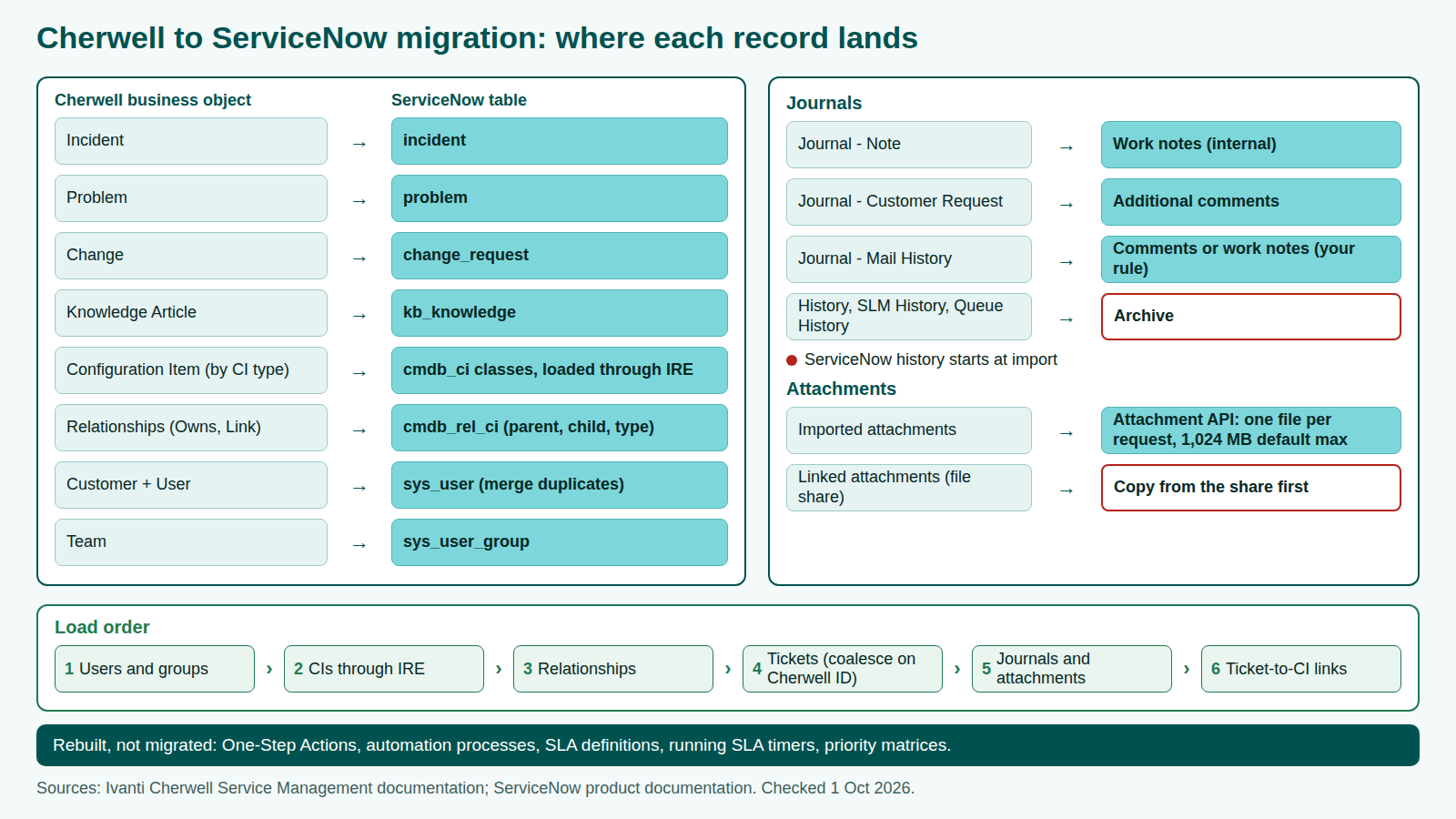
Exporting from Cherwell and importing into ServiceNow
Cherwell's export documentation is public on Ivanti's help site. Of its three routes, the REST API is the one that reads journals, related records and attachments record by record.
| Cherwell export route | What Ivanti documents | Best use |
|---|---|---|
| Data Export Tool | Full system to .czar, or one object or stored search to .csv or .xml. An Exclude Attachments option skips the files. A .czar never holds decrypted data or encryption keys (Ivanti, as of 1 Oct 2026) | Safety copy and counts |
| Grid export | CSV exports all rows; Excel only rows shown in the grid, which displays up to 20,000 rows. Only fields on the object or a one-to-one related object (Ivanti, as of 1 Oct 2026) | Spot checks |
| REST API | Searches, batch reads, related objects, attachments, and activities by page (Ivanti, as of 1 Oct 2026) | Full history and the delta pass |
Attachments need two checks. Linked attachments do not increase the database size, and users need network access to open them (Ivanti, as of 1 Oct 2026). Copy them from the share and count both types per record to prevent a lost-attachment flood at cutover.
Service Quality says subscription customers get 30 days to request a standard database export (Service Quality, as of 1 Oct 2026). Ivanti does not publish whether cloud customers can run the Data Export Tool themselves, so ask.
| ServiceNow step | Mechanism | Documented behavior or limit |
|---|---|---|
| Stage and transform | Import sets and transform maps | The Import Set API stages rows and triggers the transform (ServiceNow, as of 1 Oct 2026) |
| Safe re-runs | Coalesce on the Cherwell record ID | If several records match, only the first is updated (ServiceNow, as of 1 Oct 2026) |
| Attachments | Attachment API | One file per request; 1,024 MB default maximum (ServiceNow, as of 1 Oct 2026) |
| Knowledge | Word import or import sets | .doc and .docx; numbered headings lose their numbers (ServiceNow, as of 1 Oct 2026) |
| Reconciliation reads | Table API | 10,000 records per request by default; page with sysparm_offset (ServiceNow, as of 1 Oct 2026) |
The Cherwell to ServiceNow migration plan in phases
One quarter remains before the December 31, 2026 end of life (StrataCom, as of 1 Oct 2026). The phases match any ITSM migration; the months show order, not phase durations.
| When | Phase | What to finish | Gate |
|---|---|---|---|
| October 2026 | Discover and protect | Confirm license, hosting and dates with Ivanti in writing. Take a full .czar export. Audit legacy help desk data and count every object | History scope signed |
| October to November 2026 | Map and build | Sign off mappings. Configure ServiceNow; rebuild automations, SLA definitions and priority rules | Mapping signed |
| November to December 2026 | Test migration | Full load to sub-production, reconcile, rehearse | Go/no-go |
| December 2026, before the 31st | Cutover with delta sync | Freeze Cherwell, pull changed records by REST, re-run with the coalesce key, switch intake | Service owner sign-off |
| January 2027 | Reconcile and hypercare | Final reconciliation; cloud tenants close 30 days after end of life, per Service Quality (Service Quality, as of 1 Oct 2026) | Cherwell decommissioned |
The ServiceNow build is a separate workstream, covered in our ServiceNow implementation guide.
If cutover cannot land by December 31
Protect the history first: take the full export while access is supported, and extract encrypted fields you need in readable form, because the .czar keeps them encrypted without keys (Ivanti, as of 1 Oct 2026). One option: move open and recent records at cutover and keep the rest in a read-only archive to load later. Only on-premises perpetual installs keep running past the deadline, unsupported, per Service Quality (Service Quality, as of 1 Oct 2026).
Cherwell to ServiceNow failure points
Each failure point comes from documented behavior, so a test migration can catch it.
| Failure point | Why it happens | How to catch it |
|---|---|---|
| Internal notes on the portal | Journal - Note loaded as additional comments | Open records as a portal-only test user |
| Missing attachments | Linked files sit outside the database | Count imported and linked attachments per record |
| Unreadable encrypted fields | .czar exports hold no decrypted data or keys | List encrypted fields in discovery |
| Truncated extracts | Excel grid exports carry only rows shown | Compare extract row counts with record counts |
| Duplicate people | User and customer profiles for one person | Merge rule plus one unique coalesce key |
| Duplicate CIs | CIs written outside the IRE | Reconcile CI counts per class |
| Wrong SLA history | Timers don't move; SLA repair uses only the final state of dot-walked fields (ServiceNow, as of 1 Oct 2026) | Decide early: rebuild, carry as data, or archive |
Cherwell to ServiceNow migration checklist
- Confirm license, hosting and end-of-life date with Ivanti in writing.
- Take a full .czar export and store it outside Cherwell.
- Count objects by status, journals and attachments by type, and encrypted fields.
- Agree history scope: live, read-only archive, or retired.
- List One-Step Actions, automation processes, SLA definitions and priority matrices for rebuild.
- Confirm your ServiceNow package covers problem and change.
- Map statuses (including Pending, Assigned, Reopened) and impact and urgency.
- Map journal types to work notes, additional comments or archive.
- Merge user and customer profiles; load users and groups first.
- Load CIs through the IRE, then relationships, then ticket-to-CI links.
- Copy linked attachments and reconcile attachment counts.
- Run a full test migration, then cut over with delta sync, reconcile and staff hypercare.
The full scoping-to-hypercare list is in our ITSM migration checklist.
FAQ
Methodology
We built this guide from Ivanti's public Cherwell documentation (releases 10.1 to 2023), ServiceNow documentation and both vendors' pages, checked on 1 Oct 2026. Ivanti's lifecycle notices need a login, so the end-of-life date is attributed to StrataCom and Beyond20, and post-deadline terms to Service Quality. We read ranking pages for gaps but do not cite them. We did not run hands-on tests.
Disclosure: MigrateX, the publisher of this article, runs ITSM data migrations, including between platforms named here. No vendor reviewed or paid for this article.