

Methodology: built from ServiceNow and Atlassian documentation and pricing pages, plus one attributed buyer-data source, all checked on 1 Oct 2026. No vendor reviewed or paid for this article. We did not run hands-on tests.
A ServiceNow to Jira migration moves your service history into Jira Service Management (JSM): incidents, requested items, problems, changes, work notes and comments, attachments, users, groups, knowledge articles, and CIs with their relationships. Business rules, flows, SLA definitions, running SLA timers and notifications do not move. They are rebuilt in JSM.
You are probably here because the move to Atlassian is decided, or close, and someone has to plan it. This guide maps ServiceNow tables to JSM work items and Assets, with limits from both vendors' documentation.
Key takeaways
- ServiceNow caps list exports at 10,000 records per format by default (ServiceNow, as of 1 Oct 2026), so plan full-history extraction through the Table API.
- Jira Cloud has no ServiceNow importer; such data comes in by CSV or JSON (Atlassian, as of 1 Oct 2026).
- A CSV import makes every comment public in a JSM space, so work notes would show on the portal (Atlassian, as of 1 Oct 2026).
- SLAs keep counting on closed issues imported by CSV, because JSM calculates SLAs from issue history (Atlassian, as of 1 Oct 2026).
Why teams move from ServiceNow to Jira Service Management
Teams usually move to cut cost and to work next to engineering in Jira. These dated facts start the conversation.
| Trigger | What the source says |
|---|---|
| ServiceNow pricing is quote-only | ServiceNow sells ITSM as Foundation, Advanced and Prime with a custom quote; Problem and Change sit in Advanced (ServiceNow, as of 1 Oct 2026) |
| JSM prices are published | Service Collection lists Standard at $20 and Premium at $51.42 per agent per month, Enterprise by quote (Atlassian, as of 1 Oct 2026) |
| Atlassian price change | New cloud list prices apply from 13 Oct 2026, including JSM and Service Collection; quotes issued earlier keep the old price until they expire (Atlassian, as of 1 Oct 2026) |
| Cloud is the only new target | New customers could not buy Data Center after 30 Mar 2026, and Data Center products, JSM included, go read-only on 28 Mar 2029 (Atlassian, as of 1 Oct 2026). See our Jira Data Center end-of-life timeline |
Vendr reports a median annual ServiceNow contract of $129,871 across 109 purchases of all ServiceNow products, not only ITSM (Vendr, last updated Feb 2026, as of 1 Oct 2026). Compare a real quote with JSM Premium, the tier that matches ServiceNow Advanced on problem and change. See our ServiceNow vs Jira Service Management comparison, Jira Service Management pricing breakdown and, if the target is still open, Jira Service Management alternatives.
Does Atlassian have a ServiceNow importer?
No. Jira Cloud has named importers only for Asana, Trello and Bitbucket; ServiceNow data comes in as CSV or JSON, or through Jira's public APIs (Atlassian, as of 1 Oct 2026). Atlassian's switching advice is to set data and KPI requirements early and use an experienced partner (Atlassian, 5 Aug 2024, as of 1 Oct 2026).
What moves, what gets rebuilt, what's at risk
In a ServiceNow to Jira migration, records move as data and platform logic is rebuilt. Agree this table with process owners before mapping.
| What moves (as data) | What gets rebuilt (not migrated) | What's at risk |
|---|---|---|
| Incidents, requested items, problems and changes as work items | Business rules, flows and workflows, as automation rules and JSM workflows | Work notes turning public on a CSV import |
| Work notes and additional comments, with author and timestamp | SLA definitions, schedules and running SLA timers, as SLA goals and calendars | SLAs counting forever on imported closed issues |
| Attachments | Assignment rules and priority lookup rules | Incident to problem and change links loaded as text |
| Users, groups and companies as agents, customers, teams and organizations | Catalog items, variables and record producers, as request types and forms | CI relationships flattened or loaded without a type |
| Knowledge articles, into a Confluence-backed knowledge base | Notifications, templates and approval rules | Choice fields loaded as codes instead of labels |
| CIs and relationships, as Assets objects and references | CMDB identification and reconciliation rules | Field-level audit history, which JSM starts fresh at import |
The middle column is configuration work for the project plan. The right column is where reconciliation should focus: these data fidelity losses rarely raise an error.
ServiceNow to Jira field mapping
To migrate ServiceNow to Jira Service Management, map each ServiceNow table and field to a JSM work type, request type, field or Assets object. No vendor publishes this map, so each side comes from its own vendor's documentation.
| ServiceNow | Jira Service Management | Watch for |
|---|---|---|
| Incident [incident] | Incident work type | Six states plus On Hold reasons (ServiceNow, as of 1 Oct 2026), each needing a JSM status |
| Requested item [sc_req_item] and catalog item | Service request and a request type per catalog item | Set request type by ID, not name, or portal visibility can suffer (Atlassian, as of 1 Oct 2026) |
| Problem [problem], change request [change_request] | Problem and change work types | Premium or Enterprise only since Atlassian's October 2024 repackaging (Atlassian, as of 1 Oct 2026) |
| State | Workflow status | CSV import maps only to statuses that already exist (Atlassian, as of 1 Oct 2026) |
| Impact, urgency, priority | Priority | ServiceNow derives priority from impact and urgency (ServiceNow, as of 1 Oct 2026) |
| User [sys_user] | Agent or customer | Load users first; Jira skips watchers who don't exist yet (Atlassian, as of 1 Oct 2026) |
| Group [sys_user_group] | Team, queue or group | Rebuild assignment routing as automation |
| Company | Organization | "Organizations are groups of customers" (Atlassian, as of 1 Oct 2026) |
| Work notes / additional comments | Internal comment / public comment | See below |
| Problem, Change Request, Caused by Change fields | Linked work items | Incident references (ServiceNow, as of 1 Oct 2026); recreate as links, not text |
| Configuration item on the task | Assets object field | Links objects to work items (Atlassian, as of 1 Oct 2026) |
| Knowledge article [kb_knowledge] | Confluence page | JSM's knowledge base links Confluence spaces (Atlassian, as of 1 Oct 2026) |
Work notes must stay internal
ServiceNow says everyone who can view an incident sees its additional comments, while work notes hold resolution steps (ServiceNow, as of 1 Oct 2026). A CSV import makes every comment public in a JSM space. Work notes often hold personal data, so use a load method that sets visibility per comment, and prove from a customer account that none reach the portal.
Attachments
ServiceNow's default maximum attachment size is 1,024 MB (ServiceNow, as of 1 Oct 2026). Jira Cloud allows 1 GB per file by default and 2 GB at most (Atlassian, as of 1 Oct 2026), so the largest ServiceNow files can exceed it. The CSV importer only fetches files from URLs your Jira site can reach, so files behind ServiceNow sign-in need re-hosting or an API load. Count attachments per record on both sides to prevent a lost-attachment flood at cutover.
ServiceNow CMDB to Jira Assets
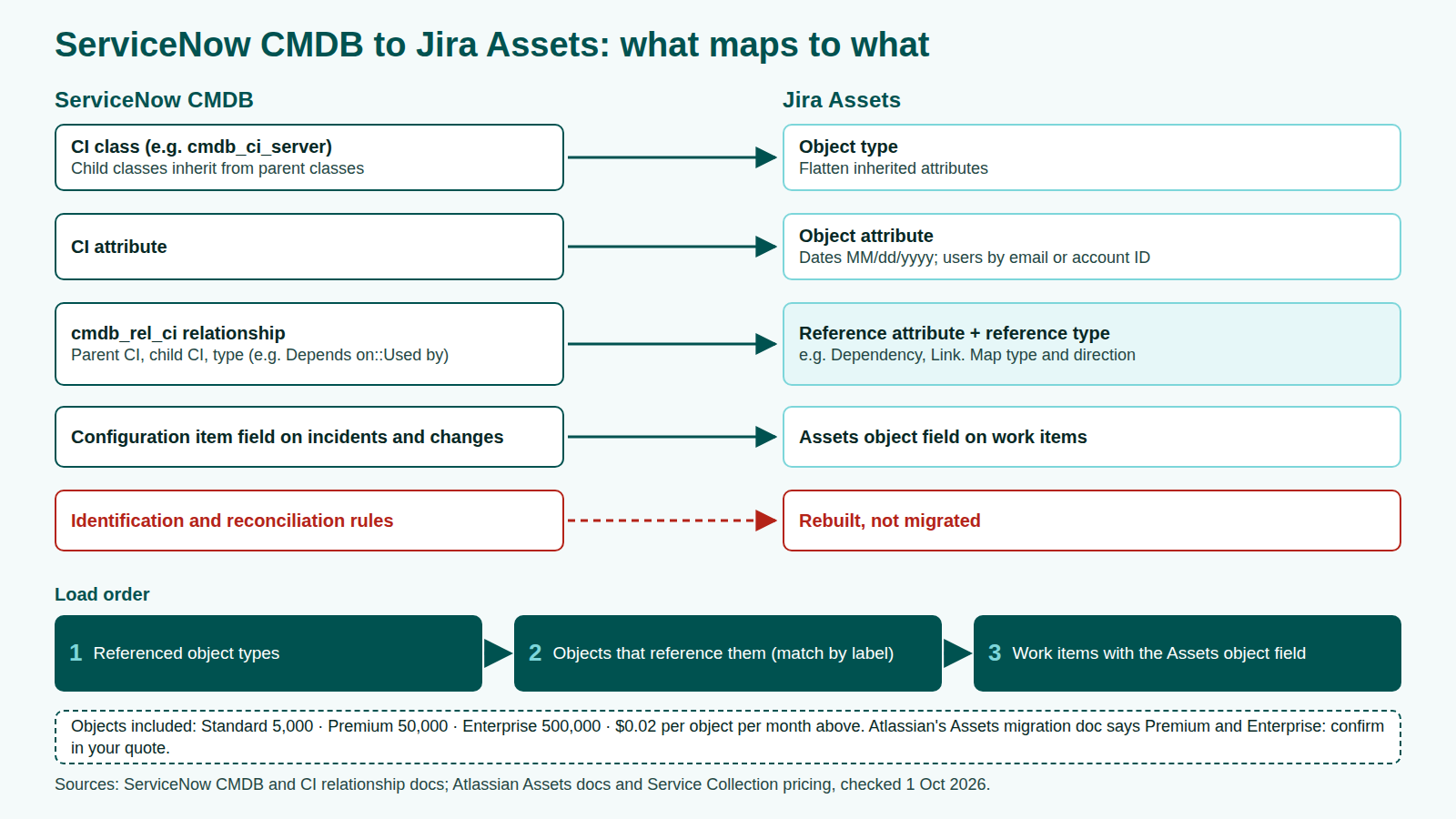
ServiceNow's CMDB is a class hierarchy and JSM Assets is a schema you design, so CIs are remapped, not copied. In ServiceNow, a laptop class extends the computer class, which extends the base CI class, and children inherit attributes (ServiceNow, as of 1 Oct 2026). In Assets, an object schema holds object types and objects, and references are the relationships between objects (Atlassian, as of 1 Oct 2026). Our ServiceNow CMDB guide explains the source model.
| ServiceNow CMDB | Jira Assets | Migration step |
|---|---|---|
| CI class (for example cmdb_ci_server) | Object type | Flatten inherited attributes |
| CI attribute | Object attribute | Assets expects dates as MM/dd/yyyy and users by email or account ID, not user name (Atlassian, as of 1 Oct 2026) |
| Relationship in cmdb_rel_ci: parent CI, child CI, type such as Depends on::Used by (ServiceNow, as of 1 Oct 2026) | Reference attribute with a reference type such as Dependency or Link (Atlassian, as of 1 Oct 2026) | Write a table of relationship types to reference types, with direction |
| Configuration item field on incidents and changes | Assets object field on work items | Load objects before work items |
| Identification and reconciliation rules | Import and data-quality rules | Rebuilt, not migrated |
Atlassian says to import a referenced object type first, or references can't resolve. Match references by object label, because each import generates new object keys (Atlassian, as of 1 Oct 2026).
Check your CI count against your plan. Atlassian's pricing page includes 5,000 Assets objects on Standard, 50,000 on Premium and 500,000 on Enterprise, then $0.02 per object per month (Atlassian, as of 1 Oct 2026). Its Assets migration doc for Server and Data Center moves says Assets comes with Premium and Enterprise (Atlassian, as of 1 Oct 2026), so confirm coverage in your quote.
Exporting from ServiceNow and importing into Jira Service Management
Check both sides' documented limits before you design batches.
| Step | What the vendor documents | Source |
|---|---|---|
| ServiceNow list export | 10,000 records per format (XML, CSV, Excel, JSON) by default; Excel capped at 500,000 cells | ServiceNow, as of 1 Oct 2026 |
| ServiceNow Table API | 10,000 records per request by default; page with sysparm_offset; filter with sysparm_query, including sys_updated_on | ServiceNow, as of 1 Oct 2026 |
| ServiceNow Attachment API | Metadata and file content from separate endpoints | ServiceNow, as of 1 Oct 2026 |
| Jira CSV import | About 1,500 work items per file, roughly an hour each by Atlassian's estimate; parent links need Work item ID and Parent columns | Atlassian, as of 1 Oct 2026 |
| Assets import | CSV with a header row, JSON, Assets Discovery or the imports REST API | Atlassian, as of 1 Oct 2026 |
For full history, use the Table API with sysparm_display_value=all, which returns stored codes and labels: labels drive mapping, sys_ids rebuild links. Our ServiceNow migration guide covers extraction and the reverse load into ServiceNow.
The ServiceNow to Jira migration plan in phases
A ServiceNow to Jira migration runs in six phases, each closed by a named owner at a go/no-go gate. It follows our ITSM migration guide and works best with a named project lead. Durations depend on your volumes and test runs, so none are given here.
- Discover. Count every table per state, including journal entries, attachments, CIs and relationships. Audit legacy data before migration so duplicates stay behind. Agree history depth with audit owners.
- Map. Build the field mapping and the relationship-type table. Configure JSM work types, request types, workflows and the Assets schema before data arrives.
- Test migration. Load every request type, long work-note threads, large attachments, linked records and CIs with references. Check it as a customer, not only as an agent.
- Cutover with delta sync. Load history early, freeze ServiceNow, then pull records whose sys_updated_on is after your last extract. Switch email channels and portal links after the delta lands.
- Reconcile. Compare counts per table and state, comment visibility, attachments, links and CI references. Record sign-off.
- Hypercare. Watch routing, SLA goals and automation. Keep ServiceNow read-only until audit owners confirm they have what they need.
Decide how imported issues handle SLAs
Because CSV-imported issues have no history, Atlassian suggests excluding them from SLA goals with a custom field, or bulk transitioning them so the SLA stops at the transition time (Atlassian, as of 1 Oct 2026). Keep historical ServiceNow SLA results as data, because neither SLA definitions nor running timers migrate.
ServiceNow to Jira failure points
Each failure comes from a documented behavior above, so a test migration can catch it.
| Failure point | Why it happens | How to catch it |
|---|---|---|
| Truncated extract | A list export stops at its default record limit | Compare extracted row counts with source counts per table |
| Work notes on the portal | CSV import makes JSM comments public | Open migrated requests from a customer account |
| SLA breaches on old tickets | Imported closed issues have no history | Check SLA fields on imported issues |
| Requests missing from the portal | Request type set by name, not ID | Search as the original requester |
| CI references blank | Referenced object types loaded too late | Check reference attributes on sample objects |
| Large attachments fail | Files above Jira's per-file setting | List large ServiceNow files before the load |
| Problem and change links lost | Reference fields exported as text | Open linked records and confirm real links |
ServiceNow to Jira migration checklist
- Count every table per state, including journal entries and attachments.
- Agree history depth with audit owners.
- List business rules, flows, SLA definitions and notifications for rebuild.
- Confirm your JSM plan covers problem, change and your Assets object count.
- Configure work types, request types and workflow statuses before any load.
- Extract through the Table API with stored and display values.
- Map every state, priority and catalog item to request type IDs.
- Choose a comment load method that keeps work notes internal.
- Check attachment sizes against Jira's per-file limit.
- Build the Assets schema, then load referenced object types first.
- Pick your SLA fix for imported issues.
- Test-migrate, check from the portal, then plan freeze, delta pass and reconciliation.
For the platform-neutral version, use our ITSM migration checklist.
FAQ
Methodology
We built this guide from ServiceNow and Atlassian documentation and pricing pages, plus one attributed Vendr benchmark, all checked on 1 Oct 2026. We read the ranking pages for gaps but do not cite them. The field map pairs each vendor's own documentation, because neither publishes one. We did not run hands-on tests.
Disclosure: MigrateX, the publisher of this article, runs ITSM data migrations, including between platforms named here. No vendor reviewed or paid for this article.