

Methodology: built from our ITSM migration guides and vendor documentation, checked on 1 Oct 2026. No vendor reviewed or paid for this article. We did not run hands-on tests.
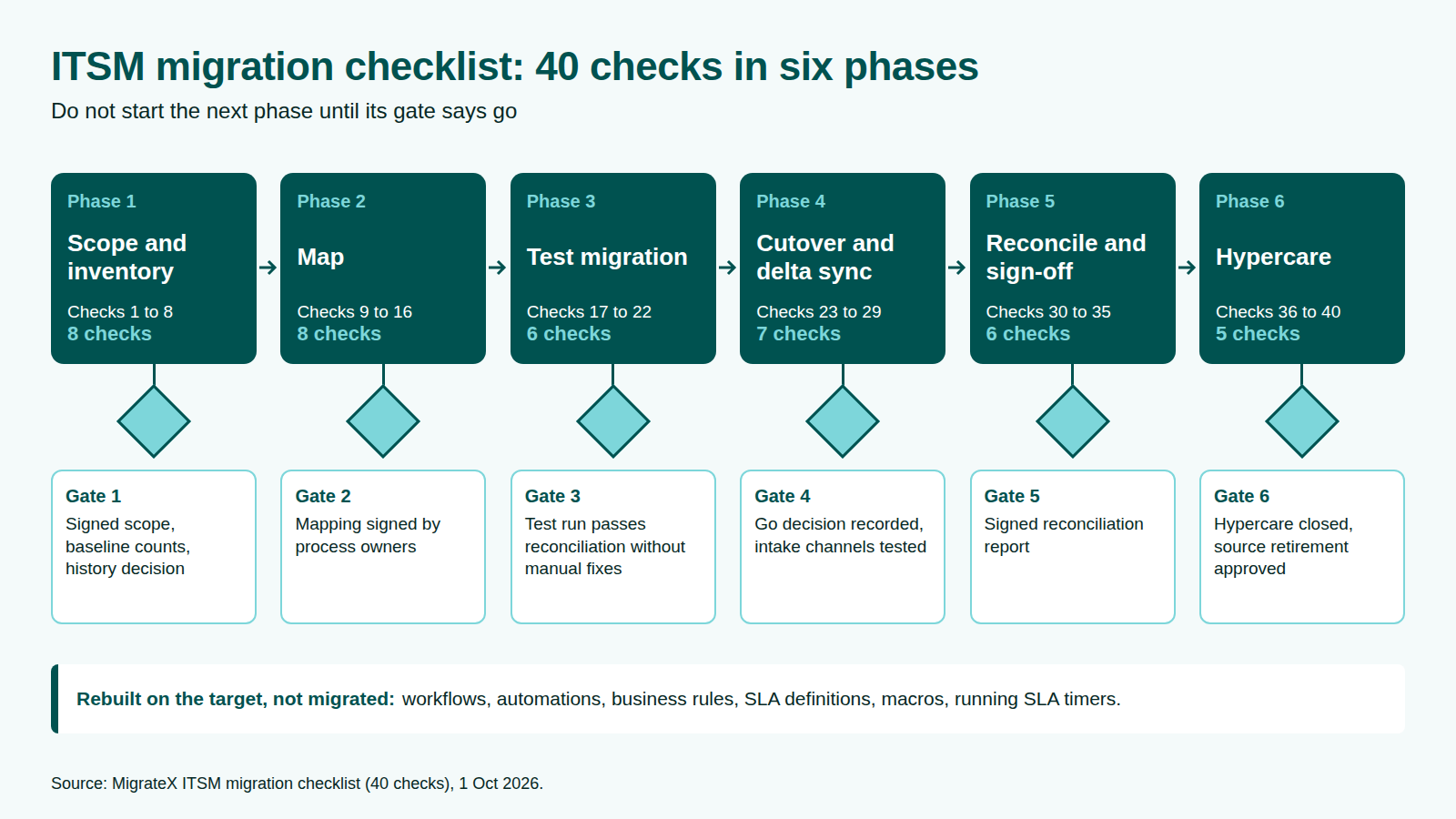
This migration checklist is for moving an IT service desk to a new platform: incidents, service requests, problems, changes, knowledge articles and CIs. It has 40 checks in six phases, each saying what "done" looks like, and a go/no-go gate closing every phase.
A generic data migration checklist copies rows. Service desk records link to each other, SLA results are computed from their history, notes are public or internal, and the desk keeps taking tickets until cutover. Workflows, automations, business rules, SLA definitions, macros and running SLA timers are rebuilt on the target, not migrated.
Key takeaways
- ServiceNow's default export limit and Freshservice's ticket export cap are both 10,000 records per export, so full history usually comes out through the API (ServiceNow; Freshservice, as of 1 Oct 2026).
- In Jira Service Management spaces, every comment imported by CSV becomes public (Atlassian, as of 1 Oct 2026).
- Jira Service Management calculates SLAs from issue history, so SLAs on closed issues imported by CSV keep counting (Atlassian, as of 1 Oct 2026).
- Priority numbers run in opposite directions: 1 is Critical in ServiceNow and Low in the Freshservice API (ServiceNow; Freshservice, as of 1 Oct 2026).
How to use this migration checklist
Tick a check only when its "done" line is true. Each phase ends with a gate, and the next phase starts only when the gate owner says go. The phases follow our ITSM migration plan in six phases.
| Phase | Checks | Gate owner |
|---|---|---|
| 1. Scope and inventory | 1 to 8 | Migration lead and audit owner |
| 2. Map | 9 to 16 | Process owners |
| 3. Test migration | 17 to 22 | Migration lead |
| 4. Cutover and delta sync | 23 to 29 | Service owner |
| 5. Reconcile and sign-off | 30 to 35 | Process owners and audit owner |
| 6. Hypercare | 36 to 40 | Service owner |
Phase 1: scope and inventory (checks 1 to 8)
Scoping decides what moves, what is archived and what is rebuilt. Leaving Cherwell? Add the dates from our Cherwell end-of-life guide.
- Name a migration lead. Done: one named lead owns every gate, and sign-off owners are named in writing (why every enterprise migration needs a project lead).
- Confirm the trigger date. Done: the vendor has confirmed in writing when your source loses support or your contract ends.
- Fix the scope. Done: a signed scope names source, target and every record type, from incidents to CI relationships, attachments and notes.
- Record baseline counts. Done: dated counts per record type and per state exist for reconciliation.
- Audit the source data. Done: duplicates, orphaned records and unused fields are tagged keep, fix or drop (how to audit legacy help desk data).
- Decide how much history moves. Done: full history, active work only, or archive plus selective migration is chosen in writing with the audit owner. itsm.tools recommends the third option (itsm.tools, as of 1 Oct 2026).
- Record platform limits. Done: export, API and import limits for both platforms are written down. For Zendesk sources, see Zendesk data migration.
- Write the rebuild list. Done: every workflow, automation, business rule, SLA definition, macro and notification is listed with an owner.
Gate 1: signed scope, dated baseline counts and a written history decision.
Phase 2: map (checks 9 to 16)
Mapping gives every source value a documented home on the target. See our ServiceNow migration guide for load order and the ServiceNow to Jira migration page for one pair.
- Build the target first. Done: workflows, statuses, request types and SLA definitions exist before mapping is signed. Jira's CSV import maps only to statuses that already exist (Atlassian, as of 1 Oct 2026).
- Map every state. Done: every source state, including rare and custom ones, has a target state.
- Map priority as impact and urgency. Done: the matrix is mapped, not the final number, and sampled priorities match.
- Map users, groups and leavers. Done: users and groups load before tickets, and leavers have an agreed form.
- Keep note visibility. Done: public replies and internal notes each have a load path that keeps their visibility.
- Plan CIs and relationships. Done: CI classes are mapped, and the order is CIs, then relationships, then task-to-CI links.
- Store the source ID. Done: every target record carries its source ID, and an old-to-new ID cross-reference exists.
- Decide SLA history. Done: historic SLA results are kept as fields, an archive or both, and open tickets with running timers have a cutover rule.
Gate 2: mapping sheets signed off by every process owner.
Phase 3: test migration (checks 17 to 22)
A test migration is a full rehearsal into a non-production target, reconciled as production will be. Our Zendesk to Jira migration guide shows what to include.
- Load a representative set. Done: the load covers every record type and state, long threads, archived records, attachments and internal notes.
- Make the load re-runnable. Done: a second run updates records instead of duplicating them. In ServiceNow, a coalesce match updates and no match inserts. If several records match, only the first updates, so coalesce on the unique source ID (ServiceNow, as of 1 Oct 2026).
- Check references. Done: no caller or group landed as plain text. In ServiceNow, a missing referenced sys_id can appear as the display value (ServiceNow, as of 1 Oct 2026).
- Check notes as a requester. Done: signed in as a customer, you can see no internal note on the portal.
- Check SLAs on imported records. Done: no historic closed record shows a breach. Atlassian suggests excluding imported issues with a custom field or bulk transitioning them to Done (Atlassian, as of 1 Oct 2026).
- Time the rehearsal. Done: the full run is timed and the freeze window sized from it. Freshservice targets: see how to import tickets into Freshservice.
Gate 3: a test run passes reconciliation without manual fixes.
Phase 4: cutover and delta sync (checks 23 to 29)
Cutover loads history early, freezes the source briefly, then picks up what changed. Our Cherwell to ServiceNow migration page runs it against a deadline.
- Load the bulk early. Done: historical records are loaded and reconciled before the freeze window opens.
- Book the freeze window. Done: it is approved as a change, and agents and requesters have been told.
- Freeze the source. Done: source changes have stopped and the freeze timestamp is recorded as the delta cut-off.
- Run the delta sync. Done: every record created or changed since the bulk load is on the target, and delta counts match.
- Load attachments as their own workstream. Done: attachment counts per record match and failures are logged. Freshservice's bulk API rejects an attachment over its 40 MB per-entity limit but still creates the ticket (Freshservice, as of 1 Oct 2026). See preventing the lost attachment flood.
- Hold the go/no-go. Done: named criteria are checked, the decision and decision-maker recorded, and a rollback point defined.
- Switch intake. Done: email, portal, phone and integrations point at the target, and a test ticket from each channel has landed.
Gate 4: go decision recorded and every intake channel tested on the target.
Phase 5: reconcile and sign-off (checks 30 to 35)
Reconciliation proves, record by record, that what arrived matches what left.
- Compare counts. Done: counts per record type and state equal baseline plus delta, or gaps are explained.
- Sample records end to end. Done: a sample per record type matches on fields, note order, visibility, authors and timestamps.
- Open the links. Done: incident, problem, change and CI links open as real links, not text.
- Check knowledge. Done: articles, their attachments and article-to-ticket links render on the target.
- Close the discrepancy log. Done: every difference has a cause and a fix, or a signed acceptance.
- Sign off. Done: process owners and the audit owner have signed the reconciliation report.
Gate 5: signed reconciliation report.
Phase 6: hypercare (checks 36 to 40)
Hypercare is the period after go-live when the migration team stays on call and fixes problems at their cause.
- Staff hypercare. Done: named contacts are on call, with a queue for migration issues.
- Watch SLAs and routing. Done: new SLA breaches, wrong assignment groups and priority mismatches are reviewed daily.
- Trace missing-data reports. Done: each missing attachment or broken link is traced to its cause and fixed in bulk.
- Keep the source read-only. Done: audit and reporting owners can open old records until they confirm they have what they need.
- Retire the source. Done: exit criteria are met, retirement is approved and the archive location is recorded.
Gate 6: hypercare closed and source retirement approved.
Printable help desk migration checklist: summary table
| # | Phase | Check | Owner | Evidence of done |
|---|---|---|---|---|
| 1 | Scope | Lead named | Sponsor | Owners in writing |
| 2 | Scope | Trigger date | Migration lead | Vendor confirmation |
| 3 | Scope | Scope fixed | Migration lead | Signed scope |
| 4 | Scope | Baseline counts | Source admin | Dated counts |
| 5 | Scope | Data audited | Process owners | Keep/fix/drop list |
| 6 | Scope | History decision | Audit owner | Written decision |
| 7 | Scope | Limits recorded | Platform admins | Limits sheet |
| 8 | Scope | Rebuild list | Target admin | List with owners |
| 9 | Map | Target built | Target admin | Configured test target |
| 10 | Map | States | Process owners | Signed state map |
| 11 | Map | Priority matrix | Process owners | Signed matrix map |
| 12 | Map | Users and groups | Target admin | Leaver rule |
| 13 | Map | Note visibility | Migration engineer | Load path per note type |
| 14 | Map | CIs and relationships | CMDB owner | Signed load order |
| 15 | Map | Source ID | Migration engineer | ID cross-reference |
| 16 | Map | SLA history | Reporting owner | Written decision |
| 17 | Test | Representative load | Migration engineer | Load log |
| 18 | Test | Re-runnable load | Migration engineer | Rerun, no duplicates |
| 19 | Test | References | Migration engineer | No text-only references |
| 20 | Test | Requester view | Service desk manager | Portal check |
| 21 | Test | Imported SLAs | Reporting owner | No historic breaches |
| 22 | Test | Rehearsal timed | Migration lead | Timed run |
| 23 | Cutover | Bulk loaded | Migration engineer | Bulk reconciled |
| 24 | Cutover | Freeze booked | Service owner | Approved change |
| 25 | Cutover | Source frozen | Source admin | Freeze timestamp |
| 26 | Cutover | Delta sync | Migration engineer | Delta counts match |
| 27 | Cutover | Attachments | Migration engineer | Counts match, failures logged |
| 28 | Cutover | Go/no-go | Service owner | Recorded decision |
| 29 | Cutover | Intake switched | Target admin | Test ticket per channel |
| 30 | Reconcile | Counts | Migration lead | Count report |
| 31 | Reconcile | Samples | Process owners | Sample sheet |
| 32 | Reconcile | Links | CMDB owner | Link sample |
| 33 | Reconcile | Knowledge | Knowledge manager | Article sample |
| 34 | Reconcile | Discrepancies | Migration lead | Closed log |
| 35 | Reconcile | Sign-off | Audit owner | Signed report |
| 36 | Hypercare | Staffed | Service desk manager | On-call rota |
| 37 | Hypercare | SLAs and routing | Service desk manager | Daily review |
| 38 | Hypercare | Missing data | Migration engineer | Root-cause log |
| 39 | Hypercare | Source read-only | Source admin | Access list |
| 40 | Hypercare | Source retired | Service owner | Retirement approval |
FAQ
Methodology
We built this checklist from four of our guides: the ITSM migration plan, ServiceNow migration, Zendesk to Jira migration and Cherwell end of life. We re-checked every vendor limit against ServiceNow, Atlassian and Freshworks documentation on 1 October 2026, and attribute one recommendation to itsm.tools. We read pages ranking for "migration checklist" for gaps but do not cite them. We did not run hands-on tests.
Disclosure: MigrateX, the publisher of this article, runs ITSM data migrations, including between platforms named here. No vendor reviewed or paid for this article.