Flow by ServiceNow: Where Your Tickets Are Stored and How to Export Them
Flow by ServiceNow bills per use and stores tickets in its own cloud, apart from your instance. See the pricing, where data lives and what export looks like.
 Ayush BothraFounding Member, MigrateX
Published 15 min read
On this page
- What is Flow by ServiceNow?
- Where does Flow store your ticket data?
- How is Flow different from your ServiceNow ITSM instance?
- What does Flow by ServiceNow cost?
- What should you ask ServiceNow in writing before rollout?
- How do you keep one ticket history if you use Flow?
- What should you do if you later consolidate?
- What if your team runs Freshservice, Jira Service Management or another ITSM tool?
- Proof: ServiceNow history moved in full
- How MigrateX handles this
- Flow by ServiceNow FAQ
- Changelog
Flow by ServiceNow keeps your tickets in its own cloud, not in your ServiceNow instance. It runs on a separate multi-tenant platform, and connecting it to an existing instance is optional, so a team that starts on Flow without sync builds a second ticket store. As of November 2026, ServiceNow has not publicly documented how that data is exported, retained or deleted, and billing is per use. Settle all three before you roll it out.
This guide is for IT leaders trialling Flow for one team, a satellite office or a newly acquired business unit. It is also for ITSM vendors competing against Flow, and their customers, who need to know what happens to the data if the pilot ends. Everything here is dated: Flow launched on 1 October 2026 and the details are changing.
Searching for "ServiceNow Flow" also returns Flow Designer, the long-standing workflow builder inside the Now Platform. That is a different product. This post is only about Flow by ServiceNow, the AI service desk.
What is Flow by ServiceNow?
Flow by ServiceNow is an AI service desk that answers and resolves employee requests inside Slack, Microsoft Teams and email, with agents working from one online queue. ServiceNow says it can be live in less than a day, with no implementation project, and that new customers can buy it without any existing ServiceNow relationship.
Here is what ServiceNow has said in public, and where:
| Fact | What ServiceNow says | Source |
|---|---|---|
| Launch | Announced 1 October 2026, controlled availability open now | ServiceNow press release, 1 Oct 2026 |
| General availability | Planned for North America and EMEA in Q4 2026; North American customers get priority access first | ServiceNow press release, 1 Oct 2026 |
| Wider availability | "Wider availability will follow in the first quarter of 2027" | CIO, 1 Oct 2026 |
| Channels | Slack, Microsoft Teams and email, which "all resolve the same way" | ServiceNow Community FAQ, 29 Sep 2026 |
| Setup time | "Flow deploys instantly and can be live in less than a day" | ServiceNow Community FAQ, 29 Sep 2026 |
| Buyers | Small teams to enterprises; also "specific departments, remote teams, or newly acquired business units" alongside a full ITSM deployment | ServiceNow press release, 1 Oct 2026 |
| Prerequisites | No ServiceNow relationship or platform prerequisite for new customers | ServiceNow press release, 1 Oct 2026 |
| Integrations | Automations can start from a schedule, webhook, API call or event; other bots and AI assistants "can reach Flow the same way, over APIs or MCP" | ServiceNow Community FAQ, 29 Sep 2026 |
The pitch is speed. The trade-off, for anyone who already runs ServiceNow or another ITSM tool, is that Flow's tickets do not start life in the system you already govern.
Where does Flow store your ticket data?
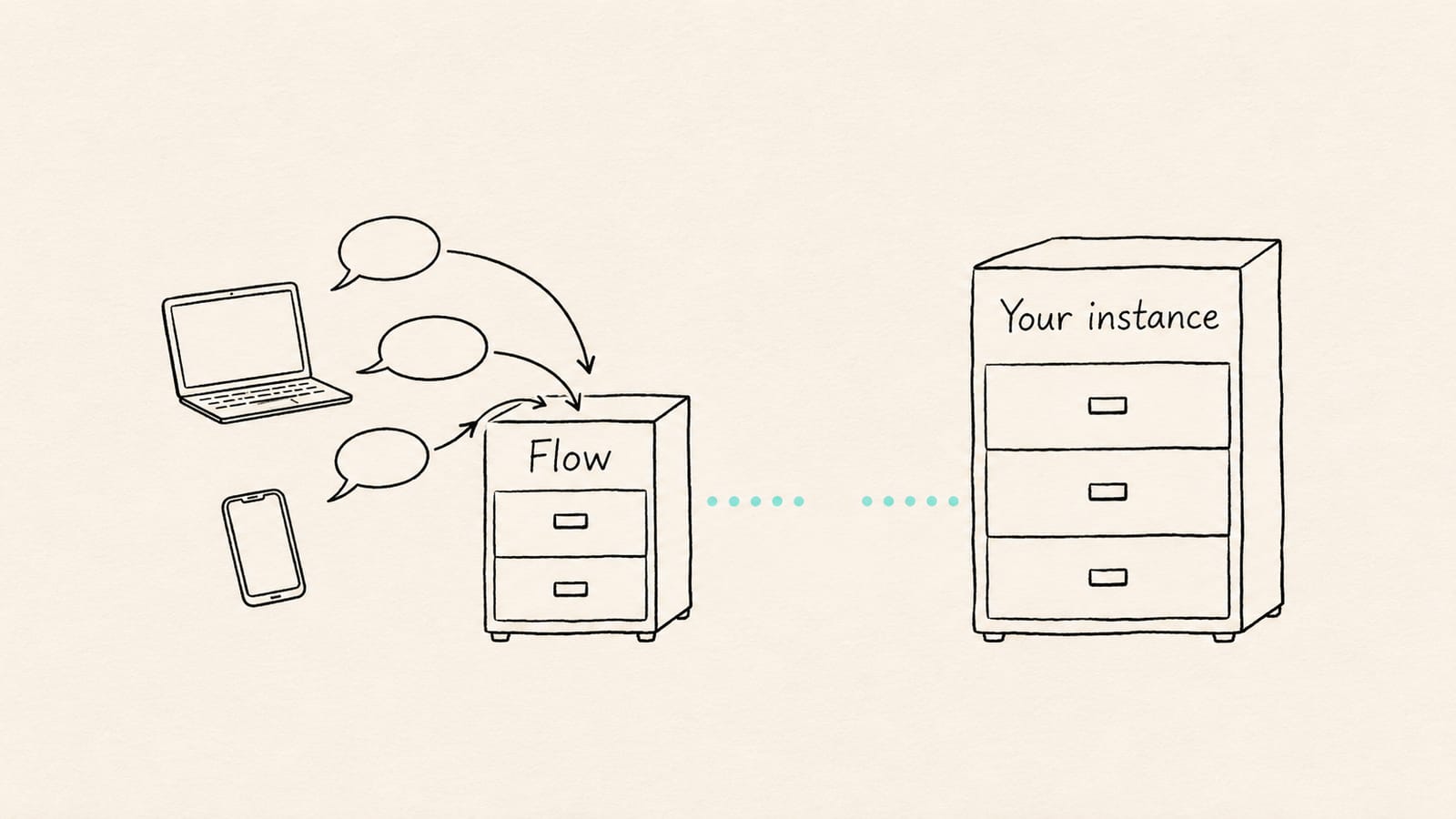
Flow stores ticket data on its own multi-tenant cloud, which ServiceNow describes as a standalone architecture separate from customer instances. Your ServiceNow ITSM instance holds its own database. Unless you connect the two, a conversation handled in Flow exists only in Flow, and nothing in your instance records it.
That matters for three reasons:
- Reporting splits in two. Volumes, resolution times and satisfaction for the Flow team sit outside the dashboards your instance runs. Anyone reporting on the whole service desk has to combine two sources.
- Audit and legal hold get harder. If an auditor, regulator or lawyer asks for every request a person raised, you now search two systems, one of which has no published export method.
- AI and knowledge lose context. Now Assist, search and any model you train on your history only see what is in the instance. Tickets that live in Flow are invisible to them.
ServiceNow's public material does not say where Flow's multi-tenant cloud is hosted, which regions it uses, or whether a customer can choose data residency. The ServiceNow Community FAQ says the rollout is staged and does not address residency at all. If your acquired unit is in a regulated industry or outside North America, that is the first question to ask.
How is Flow different from your ServiceNow ITSM instance?
Flow is a lightweight AI front door with its own data store and usage billing; your ServiceNow instance is the system of record, with documented tables, export tools, CMDB, change and problem management, and subscription licensing. ServiceNow itself says customers who need change, problem or CMDB-driven processes should stay on ITSM.
| Flow by ServiceNow (as of Nov 2026) | Your ServiceNow ITSM instance | |
|---|---|---|
| Data store | Its own multi-tenant cloud, separate from your instance (ServiceNow Community FAQ) | Your instance's own database |
| Tables and schema | Not publicly documented | Documented tables: incident, sc_req_item, task, sys_journal_field (comments and work notes), sys_audit (field history), sys_attachment (files) |
| Sync | Optional bidirectional sync with a ServiceNow instance; "it isn't required to get started." Field mapping and sync scope are not publicly documented | Native. Integrations with other systems are yours to build and govern |
| Export | No public export method documented | List exports (default limit 10,000 rows per export, set by glide.ui.export.limit and format-specific properties; Excel capped below 500,000 cells), Table API with paging, XML |
| Retention | Not publicly documented | Set by your own archive and cleanup rules, and by your contract at the end of the subscription |
| Deletion | Not publicly documented | Under your control, by table, through your admins |
| CMDB | Not included; ServiceNow points customers who need CMDB-driven processes to ITSM | Included from ITSM Foundation |
| Change and problem management | Not included; customers who need them stay on ITSM | Included in ITSM Advanced and Prime |
| Pricing model | Per use: per conversation and per automation run, with an annual commitment for new customers; assists for existing customers | Subscription priced per fulfiller by tier (Foundation, Advanced, Prime), quote only, with Now Assist usage metered in assists |
One more point to note before you rely on the "not a replacement" line: the same ServiceNow Community FAQ that says Flow is not a replacement for ITSM also calls it "a full-stack ITSM" in a separate answer. Ask your account team which description your contract reflects.
For the full ServiceNow tier and assist rules, see our ServiceNow pricing guide.
What does Flow by ServiceNow cost?
Flow is billed per use. As reported by InvGate from Flow's own pricing page (checked 16 October 2026), new customers pay $2 per conversation and $1 per automation run, against a $10,000 annual commitment that auto-renews, with $1,000 top-ups. Existing ServiceNow customers pay 10 assists per conversation and 5 assists per automation run.
The ServiceNow Community FAQ (29 September 2026) gives the same unit rates and the $10,000 annual minimum commit, and says each conversation consumes $2 "whether it results in an automation." Flow's pricing page could not be loaded directly for this post, so treat every figure as reported and confirm it in your order form.
How the units work, as reported:
| Unit | New customer (reported) | Existing ServiceNow customer (reported) | When it is charged |
|---|---|---|---|
| Conversation | $2 | 10 assists | Once per issue, whether handled by AI or a person; automations that run inside it are free |
| Automation run | $1 | 5 assists | Only when an automation is triggered outside an employee conversation, for example by an API call, another agent or MCP |
| Annual commitment | $10,000, auto-renews, $1,000 top-ups | Uses assists you already own or buy | Yearly |
| Trial | Free for 30 days, no credit card | Same | Start of evaluation |
A worked cost example
Take an acquired business unit of about 400 employees that raises 500 requests a month through Slack and Teams, plus 150 automations a month triggered outside conversations, such as a nightly access review called by API. These volumes are illustrative; use your own ticket counts.
| Line | Calculation | New customer (reported rates) | Existing customer (reported rates) |
|---|---|---|---|
| Conversations | 500 a month × 12 = 6,000 | 6,000 × $2 = $12,000 | 6,000 × 10 = 60,000 assists |
| Automations outside conversations | 150 a month × 12 = 1,800 | 1,800 × $1 = $1,800 | 1,800 × 5 = 9,000 assists |
| Year total | $13,800, above the $10,000 commitment | 69,000 assists from your pool |
Two things change the bill more than the rates do:
- Small teams still pay the commitment. A 100-person team with 150 conversations a month would use about $3,600 a year at the reported rate, but the reported annual commitment is $10,000. Ask whether unused commitment rolls over or expires.
- Assists have no published dollar value. For existing customers, the cost depends on how many assists your contract includes and what extra assists cost, and ServiceNow does not publish either. For scale: in ServiceNow's Now Assist Overview (effective 24 August 2026), one Now Assist panel conversation uses 5 assists and one incident assigned to the L1 IT Service Desk AI Specialist uses 15. A Flow conversation, at a reported 10, sits between the two. Count Flow usage against the same pool your Now Assist pilots draw on.
For how ServiceNow licensing and assist overages work in the main contract, read the AI section of our ServiceNow pricing guide.
Planning Flow next to an existing desk, or moving off one? We'll map where your history should live and run a free 100-record sample; fixed quote within 24 hours. Book a scoping call.
What should you ask ServiceNow in writing before rollout?
Ask for written answers on data location, export, retention, deletion, sync scope and pricing before any employee raises a real ticket in Flow. None of these are covered in ServiceNow's public material as of November 2026, and a pilot that becomes permanent makes them much harder to negotiate later.
Send these to your account team and keep the replies with the order form:
Data location and access
- In which regions is Flow data hosted, and can we choose the region for this business unit?
- Which ServiceNow entity processes the data, and does our existing data processing agreement cover Flow, or is a separate one needed?
- Who at ServiceNow can access Flow conversation content, and is it used to train any model?
Export and exit
- How do we export every Flow conversation, with timestamps, authors, internal notes and attachments, in a documented format?
- Is there an API that returns full conversation history, and what are its rate limits?
- If we cancel, how long do we have to export, and in what format is the data handed over?
Retention and deletion
- How long is Flow data retained by default, and can we set our own retention period?
- How do we delete one person's data on request, and how do we confirm it is deleted from backups?
- Can we place a legal hold on Flow records?
Sync with our instance
- Which records and fields does bidirectional sync write to our instance: incidents, requests, comments, work notes, attachments, satisfaction scores?
- Does sync back-fill conversations that happened before we turned it on?
- If sync fails, which system wins, and how are conflicts logged?
Pricing and contract
- Does unused annual commitment roll over or expire, and how are top-ups triggered?
- For existing customers: how many assists does a Flow conversation use in our contract, and do they come from the same pool as Now Assist?
- Which parts of Flow move from controlled availability to general availability terms in Q4 2026, and does anything in our order form change then?
If an answer is "not yet decided," write that down too. It tells you how much of the trial's history you should keep only in Flow.
How do you keep one ticket history if you use Flow?
Keep one history by deciding up front which system is the record. In most organizations that already run ServiceNow, the instance should stay the system of record and Flow should be the front door: turn on bidirectional sync before go-live, check what lands in the instance, and keep a dated export routine until ServiceNow documents one.
A practical setup, in order:
- Choose the system of record in writing. For anything that touches CMDB, change, problem or audit, that is the instance, because Flow does not cover them.
- Turn on sync before the first real ticket. Sync is optional and ServiceNow does not say it back-fills, so every conversation before it is switched on may exist only in Flow.
- Test sync with ten real requests. Raise them in Slack, Teams and email. In the instance, check the record type, requester, assignment group, comments, work notes, attachments and timestamps. Compare field by field.
- Map categories once. Use the instance's categories, assignment groups and priorities in Flow, so synced records report alongside the rest.
- Keep a monthly export. Until an export method is documented, record how you can retrieve Flow history (API, sync or a vendor-provided file) and test it monthly.
- Report from the instance. If a number only exists in Flow, treat it as a gap to fix, not a second dashboard.
Our guide to what ticket history to migrate explains which records, comments and fields matter most for reporting, audit and AI.
What should you do if you later consolidate?
If you later fold the Flow team into your main instance, or move everyone to another ITSM tool, treat it as a migration with a source you do not fully control. Get the export method confirmed first, then map, sample, load with original authors and dates, and reconcile counts before you switch Flow off.
The steps:
- Confirm what you can get out. Use the written answers from the questions above. If only synced records are reachable, list what never synced.
- Pick the target and the record type. Flow conversations usually land as incidents or requested items. Decide which, by category, before mapping fields.
- Map people first. Requesters and agents in Flow need matching users in the target, including people who have left, or history gets credited to an integration user.
- Keep original dates and authors. Load with the original created and updated timestamps and authors, and mute notifications, so employees are not emailed about closed requests.
- De-duplicate synced records. If sync was on for part of the pilot, some conversations already exist in the instance. Match them on a stable key so they are not loaded twice.
- Reconcile before switch-off. Count records by status and month in both systems, diff a sample field by field, and check attachments open. Our data migration validation guide lists the checks.
- Keep Flow read-only until sign-off. Do not cancel until the reconciliation report is signed and the export window in your contract is known.
Merging the acquired unit's own ServiceNow instance as well? See how to merge ServiceNow instances. Need everything out of an instance, not just Flow? See how to export all records from ServiceNow.
What to have ready for the scoping call
- Which teams use Flow, since when, and whether sync was on
- Rough monthly conversation and automation counts
- Your target: the existing instance, a new instance, or another ITSM tool
- What has to come across: comments, internal notes, attachments, satisfaction scores
- Any retention, legal hold or data residency rules for the business unit
- Your target go-live or contract end date
What if your team runs Freshservice, Jira Service Management or another ITSM tool?
Flow can be bought without any ServiceNow relationship, so a team on Freshservice, Jira Service Management, HaloITSM, ManageEngine or Zendesk could trial it alongside your desk. ServiceNow's public material documents sync with a ServiceNow instance only; as of November 2026 it does not document sync with other ITSM tools.
What that means for each reader:
- If you run another ITSM tool and a team wants to trial Flow: assume the trial's tickets will not reach your desk unless someone builds and tests an integration. Ask the same written questions on export and retention, and agree before the trial starts where the history goes if it ends.
- If you are an ITSM vendor competing against Flow: the strongest answer to "Flow is live in a day" is a clear plan for the data. Prospects need to know their history, including anything created during a Flow trial, can come across with authors, dates and attachments. Our guide to build or partner for SaaS data migration weighs the options. See how we work with vendors.
- If Flow came with an acquisition: inventory it like any other inherited system: who uses it, what it holds, what the contract says, and which system the unit will run on in a year.
Moving the whole desk instead? Our route guides cover ServiceNow to Freshservice, ServiceNow to Jira Service Management and Freshservice to ServiceNow.
Proof: ServiceNow history moved in full
Consolidation works when the history comes across intact. Covia, an industrial minerals company operating in the US and Mexico, moved from ServiceNow to Freshservice with MigrateX: more than 1.03 million records and 9 years of history, including English and Spanish records, with 369,000+ records moved in one weekend.
"As far as the data goes, the MigrateX team has it handled. Scope it right, and they'll make sure everything gets across, so you can focus your energy on the workflows. They make the data seem like the straightforward part." Gary Huck, Service Desk Supervisor, Covia (read the Covia story).
Partners use the same process. Metro Systems, an IT services partner in Thailand, delivered a ServiceNow to Freshservice move for an energy group through MigrateX: 19,970 records in 136 minutes (read the Metro Systems story).
How MigrateX handles this
MigrateX is an AI migration platform, and ITSM experts review every step. For a Flow pilot next to an existing desk, or a consolidation after one, here is what we do:
- Map where your history should live. We look at what sits in Flow, what sits in your instance or other ITSM tool, and what has already synced, then agree one system of record and a field map.
- Free 100-record sample on your data. We move 100 records you choose, including comments, work notes and attachments, and your team checks them. Then you get a fixed quote within 24 hours.
- Connectors for both ends. 191 connectors, all live, including ServiceNow, Freshservice and Jira Service Management, and ServiceNow-to-ServiceNow moves between instances. If Flow exposes the data you need through an API or export, we build a new connector in 2 to 3 days; we confirm what is reachable during scoping. See the connector list.
- Full history, with proof. We keep original authors, dates, comments and attachments, and hand over a reconciliation report: 100% data fidelity, every record counted source to target. A rollback plan is ready for every production cutover.
- Security your reviewers can check. SOC 2 Type II, GDPR and HIPAA compliant, with a DPA available. See security.
- For partners. MSPs and integrators can deliver it white-label. See partners.
Trusted by 1,000+ companies globally. See how it works, or our ServiceNow platform page.
Facts checked November 11, 2026 from ServiceNow Community: What is Flow by ServiceNow? (29 Sep 2026), ServiceNow press release: Introducing Flow by ServiceNow (1 Oct 2026), InvGate: Flow by ServiceNow (16 Oct 2026, citing Flow's pricing page), CIO: ServiceNow launches standalone AI service desk (1 Oct 2026), ServiceNow docs: Export limits and ServiceNow docs: Table API. No vendor paid for this article. How we research
Flow by ServiceNow FAQ
Is Flow by ServiceNow the same as ServiceNow ITSM?
No. ServiceNow describes Flow as a standalone AI service desk on its own multi-tenant cloud, used through Slack, Microsoft Teams and email. Customers who need change management, problem management or a CMDB-driven process stay on ServiceNow ITSM, and existing customers can run both side by side (ServiceNow Community FAQ, 29 Sep 2026).
Does Flow store tickets in my ServiceNow instance?
Not by default. Flow keeps its own data on its own cloud. Existing customers can connect Flow to their instance for bidirectional sync, but ServiceNow says it "isn't required to get started," and it has not published which fields sync or whether earlier conversations are back-filled. Turn sync on before go-live and test it.
How much does Flow by ServiceNow cost?
As reported from Flow's pricing page (InvGate, 16 Oct 2026) and stated in ServiceNow's Community FAQ: $2 per conversation and $1 per automation run, with a $10,000 annual commitment for new customers. Existing ServiceNow customers pay 10 assists per conversation and 5 per automation run. A 30-day free trial needs no credit card.
Can I export my data from Flow by ServiceNow?
ServiceNow has not publicly documented an export method, a retention period or a deletion process for Flow as of November 2026. Flow does expose APIs and MCP for automations, but that is not the same as a documented full-history export. Ask your account team for the export method, format and post-cancellation window in writing.
Who is Flow by ServiceNow for?
ServiceNow positions Flow for teams that want a service desk running within a day: small teams up to enterprises, plus specific departments, remote teams and newly acquired business units next to a full ITSM deployment. New customers can buy it without an existing ServiceNow relationship (ServiceNow press release, 1 Oct 2026).
Is Flow by ServiceNow the same as Flow Designer?
No. Flow Designer is the workflow-building tool inside the ServiceNow platform, used to automate processes on your instance. Flow by ServiceNow, launched on 1 October 2026, is a separate AI service desk product with its own cloud and usage-based pricing.
Can MigrateX move Flow history into ServiceNow or another ITSM tool?
Yes, once the data is reachable. Synced records already in your instance move like any other ServiceNow data. For records only in Flow, we confirm during scoping what its API or export returns, and build a connector in 2 to 3 days if needed. Start with a free 100-record sample and a fixed quote within 24 hours.
Planning Flow next to an existing desk, or moving off one? We'll map where your history should live and run a free 100-record sample; fixed quote within 24 hours. Book a scoping call.
Changelog
- 11 Nov 2026: First published. Flow facts checked against ServiceNow's press release (1 Oct 2026), ServiceNow Community FAQ (29 Sep 2026), CIO (1 Oct 2026) and InvGate (16 Oct 2026).

Written by
Ayush BothraFounding Member, MigrateX
Ayush writes about ITSM platforms, pricing and what it takes to move a service desk to a new platform without losing its history.