

Methodology: built from Freshservice support articles, the Freshservice API reference, Freshworks migration pages and staff replies on the Freshworks Community, all checked on 1 Oct 2026. No vendor reviewed or paid for this article. We did not run hands-on tests.
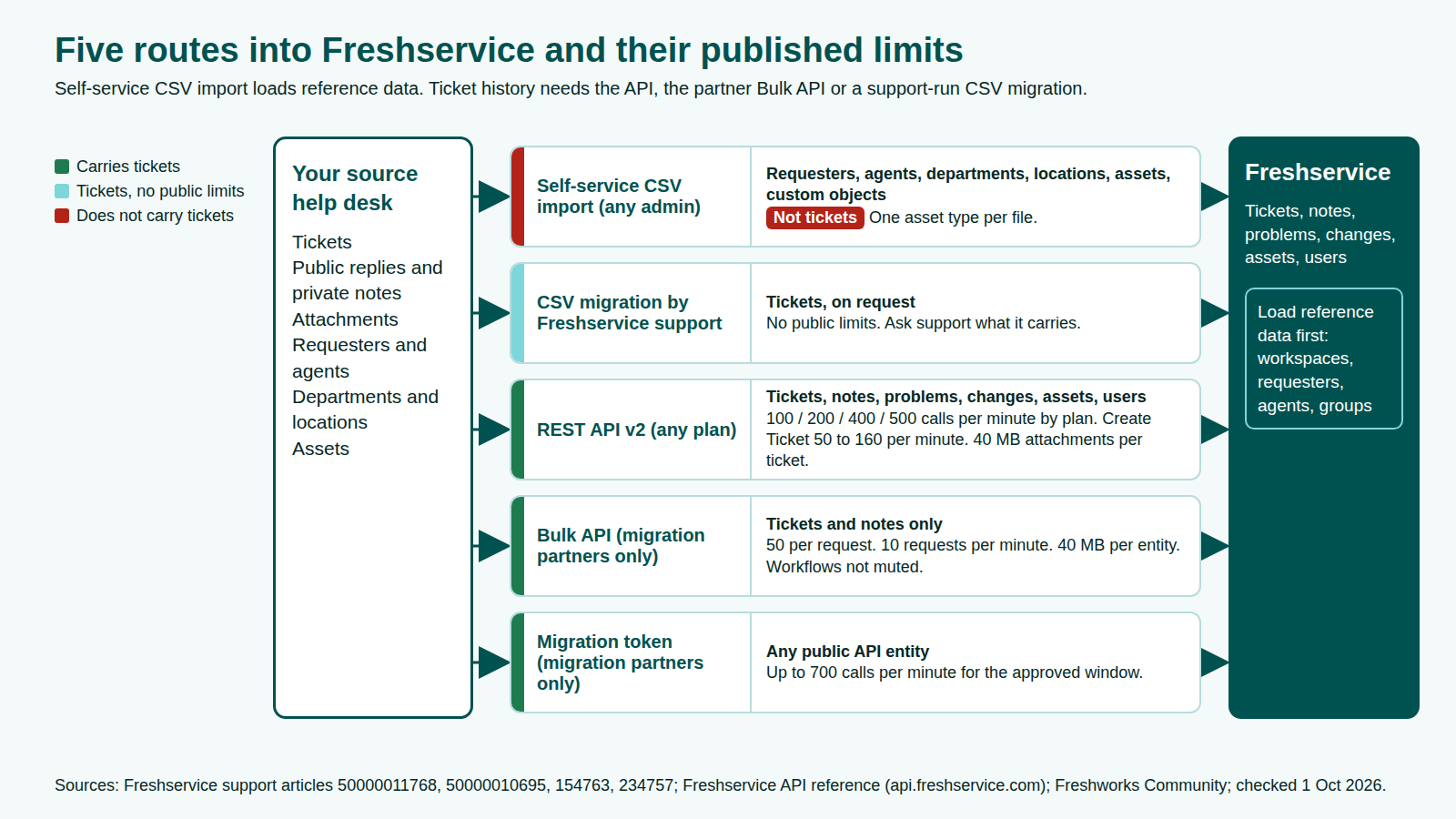
You can't import tickets into Freshservice with its self-service CSV importer. That importer covers requesters, agents, departments, locations, assets and custom objects. Ticket history goes in through the Freshservice REST API, the Bulk API reserved for Freshservice data migration partners, or a CSV migration run by Freshservice support on request.
If you searched "freshservice import tickets" because your team is moving onto Freshservice and wants its old incidents and requests too, this guide sets every route beside Freshworks' published limits. It covers what moves, what gets rebuilt and how to plan a cutover you can reconcile.
Key takeaways
- Freshservice documents CSV import for requesters, agents, departments, locations, assets and custom object records, but no self-service CSV import for tickets (Freshservice support, as of 1 Oct 2026).
- The REST API allows 100, 200, 400 or 500 calls per minute on Starter, Growth, Pro and Enterprise, and Create Ticket has its own sub-limit of 50 to 160 per minute (Freshservice API, as of 1 Oct 2026).
- The Bulk API is for Freshservice data migration partners only: tickets and notes, 50 per request, 10 requests per minute, attachments up to 40 MB per entity (Freshservice support, as of 1 Oct 2026).
- Business rules, workflows, Slack and Teams "will not be muted" during a bulk import (Freshservice support, as of 1 Oct 2026). Workflows, SLA policies and running SLA timers are rebuilt, not imported.
Why teams import tickets into Freshservice in 2026
Most teams import history because the old platform is closing. These dated triggers are pushing service desks to move.
| Trigger | What the source says |
|---|---|
| Cherwell end of life | Cherwell Service Management reaches end of life on 31 Dec 2026, according to StrataCom (StrataCom, as of 1 Oct 2026) and Beyond20 (Beyond20, as of 1 Oct 2026). See our Cherwell end-of-life plan |
| Jira Data Center end of life | New customers could not buy Data Center after 30 Mar 2026, and Jira Service Management Data Center reaches end of life on 28 Mar 2029 (Atlassian, as of 1 Oct 2026). See our Jira Data Center end-of-life timeline |
| Freshservice on more shortlists | Freshworks says it was named a Leader in the 2026 Gartner Magic Quadrant for IT Service Management Platforms, published 27 Jul 2026 (Freshworks, as of 1 Oct 2026) |
Still choosing? Compare Freshservice vs ServiceNow and Zendesk vs Freshservice. Plans matter here too: see the Freshservice pricing guide.
Freshservice ticket import options at a glance
A Freshservice ticket import has three documented routes: the public REST API, the partner-only Bulk API, and a CSV migration run by Freshservice support. Self-service CSV import is for the records tickets depend on.
| Route | What it imports | Who can use it | Documented limits | Source (as of 1 Oct 2026) |
|---|---|---|---|---|
| Self-service CSV import | Requesters, agents, departments, locations, assets, custom objects. Not tickets | Any admin | CSV only; one asset type per file | Freshservice support |
| CSV migration by Freshservice support | Tickets, on request | Customers who ask support | None published; in 2021 Freshservice staff said support would "perform a CSV migration from our end" | Freshworks Community |
| REST API v2 | Tickets, conversations, problems, changes, assets, users | Any plan | 100 to 500 calls per minute by plan; Create Ticket 50 to 160 per minute; 40 MB of attachments per ticket | Freshservice API |
| Bulk API | Tickets and notes only | Data migration partners | 50 records per request; 10 requests per minute; 40 MB per entity | Freshservice support |
| Migration token | Any public API entity | Data migration partners | Up to 700 calls per minute for an approved window | Freshservice support |
What Freshservice CSV import covers, and why tickets aren't on the list
Freshservice data import by CSV is built for reference data: the people, places and things tickets point to. Load it first, because tickets and notes reference it by ID or email.
| Module | Where to import | What to know | Source (as of 1 Oct 2026) |
|---|---|---|---|
| Requesters | Admin > User Management > Requesters | Reporting Manager must be an email address; create locations first | Freshservice support |
| Agents | Admin > User Management > Agents | An "Occasional" column marks occasional agents | Freshservice support |
| Departments or companies | Admin > User Management > Departments/Companies | Name is mandatory | Freshservice support |
| Locations | Admin > Asset Management > Locations | UTF-8; parent written as a path, such as "USA/ California" | Freshservice support |
| Assets | Inventory > Import | One asset type per import; hardware matches on serial number by default; Used By takes an email | Freshservice support |
| Custom object records | The object's Import option | Record ID decides update, insert or skip | Freshservice support |
None of these articles gives a file size or row limit, so test a full-size file.
Tickets are different: we found no Freshservice support article documenting a self-service ticket import. Freshservice staff on the Freshworks Community have pointed customers to two options: ask support for a CSV migration, or create tickets through the API with a script (Freshworks Community, as of 1 Oct 2026). Ask what it carries today, especially notes, attachments and original dates.
Freshservice API and Bulk API limits
Your plan's rate limit sets how fast history loads through the API. Accounts created on or after 1 Sep 2020 use per-minute limits (Freshservice API, as of 1 Oct 2026).
| Calls per minute | Starter | Growth | Pro | Enterprise |
|---|---|---|---|---|
| Overall account limit | 100 | 200 | 400 | 500 |
| Create, View or Update Ticket | 50 | 80 | 140 | 160 |
| List All Tickets or Requesters | 40 | 70 | 120 | 140 |
Source: Freshservice API, as of 1 Oct 2026.
Live integrations share the overall limit during the load. Add-on packs lift it to 1,000 or 2,000 calls per minute, and a Retry-After header says how long to wait once you hit it (Freshservice API, as of 1 Oct 2026).
The Bulk API for migration partners
The Bulk API imports "Tickets and Notes" only, and Freshservice marks its rate limits "To be confirmed post load testing"; other entities use the public API (Freshservice support, as of 1 Oct 2026). Its rules:
- At most 50 records per request and 10 requests per minute per bulk endpoint; job status checks allow 75 per minute (Freshservice support, as of 1 Oct 2026).
- Each request returns a job ID. Freshservice says failed records "cannot be retried automatically", so log and resubmit them.
- Attachments must sit at public URLs, up to 40 MB per entity (Freshservice support, as of 1 Oct 2026). A larger file is rejected; its ticket or note is still created.
- A note needs its ticket to exist first, and workspaces and users must exist before records that use them.
On our arithmetic, 50 records at 10 requests a minute caps bulk ticket creation at 500 tickets a minute before notes (Freshservice support, as of 1 Oct 2026).
The migration token
Approved partners can request a migration token by giving the account ID, an approximate ticket count, future start and end dates and the region. It raises the public API limit to 700 calls per minute for that partner, account and window, and keeps agents from being blocked by spam protection (Freshservice support, as of 1 Oct 2026).
Before you start: scope and inventory
Count what you have before you pick a route: tickets, problems and changes per status; public replies and private notes; attachments, flagging oversized files; requesters, agents, groups and locations; assets by type; custom fields. Our guide on how to audit legacy help desk data before a migration walks through it.
Then agree with audit and reporting owners how much history moves: all of it, a cut-off, or a cut-off plus a read-only archive. Leaving Zendesk? Our Zendesk data migration guide covers what each Zendesk export includes.
What moves, what gets rebuilt, what's at risk
Records move as data. Configuration is rebuilt. Freshworks' own Zendesk migration guide says automation rules, triggers, workflows and "SLA policies and business rules" need manual reconfiguration (Freshworks, as of 1 Oct 2026).
| What moves (as data) | What gets rebuilt (not migrated) | What's at risk |
|---|---|---|
| Incidents and service requests with status, priority and custom fields | Workflow Automator workflows and business rules | Original created and resolved dates |
| Public replies and private notes | SLA policies, business hours and running SLA timers | Private notes made public by a mapping error |
| Attachments within the per-entity limit | Canned responses, scenario automations, notifications | Oversized attachments and files behind a sign-in |
| Requesters, agents, departments, locations | Service catalog items and forms | Links between incidents, problems, changes and assets |
| Assets and CIs, one asset type per CSV | Assignment rules and group routing | Notes credited to the import user, not the author |
| Problems, changes and releases, via the public API | Integrations and Slack or Teams channels | Unmuted workflows firing on imported tickets |
Sources: Freshservice support and Freshservice API, as of 1 Oct 2026.
Keeping each record's meaning, not only its fields, is what data fidelity in migration means. Keep historical SLA results as data, because definitions and live timers start fresh in Freshservice.
Field mapping for a Freshservice ticket import
Build the mapping before any data moves.
| Source element | Freshservice target | Watch for |
|---|---|---|
| Status | Open (2), Pending (3), Resolved (4), Closed (5), plus custom statuses (Freshservice API, as of 1 Oct 2026) | The SLA timer for Pending and each custom status can be switched on or off (Freshservice support, as of 1 Oct 2026) |
| Priority or priority matrix | Low (1), Medium (2), High (3), Urgent (4) (Freshservice API, as of 1 Oct 2026) | Collapse impact and urgency into these values with a written rule |
| Requester | requester_id or email | Create Ticket needs one of them, so import requesters first |
| Assignee and group | responder_id and group_id | Create agents and groups before tickets |
| Public reply or internal note | Note with private and incoming flags | The Bulk API note carries user_id, private and incoming (Freshservice support, as of 1 Oct 2026) |
| Business unit or team | workspace_id | Create workspaces first |
| Created and resolved dates | created_at | The API reference describes it only as "Ticket creation timestamp". Confirm how your route keeps original dates |
Private notes, authors and attachments
Prove in testing that internal notes stay hidden from requesters and show their original author. Count attachments per ticket on both sides, and decide before the load what happens to files over the 40 MB limit (Freshservice support, as of 1 Oct 2026). Our guide to preventing a lost-attachment flood at cutover covers the options.
The Freshservice migration plan in phases
A Freshservice migration runs as a controlled change in six phases, each with an owner and a go/no-go gate. Freshworks describes its own approach as demo, full and delta migration (Freshworks, as of 1 Oct 2026), which fits the phase model in our ITSM migration guide.
- Discover. Run the inventory and record your plan's API limits.
- Map. Configure workspaces, statuses, fields, groups and SLA policies. Import requesters, agents, departments, locations and assets by CSV.
- Test migration. Switch off workflows, business rules and Slack or Teams notifications first. Load a slice with long threads, private notes, large attachments and every ticket type. Expect a delay before migrated data appears in search and analytics (Freshservice support, as of 1 Oct 2026).
- Cutover with delta sync. Load history ahead, freeze the source briefly, load what changed, then switch email channels and portal links.
- Reconcile. Compare counts per object and status, then sample tickets end to end. Ticket exports stop at 10,000 tickets each (Freshservice support, as of 1 Oct 2026), so split checks by date range or use the API.
- Hypercare. Re-enable workflows one at a time, watch SLA timers, and keep the source read-only until audit owners sign off.
Our ITSM migration checklist breaks each phase into individual checks.
Common failure points
Each comes from documented Freshservice behavior, so a test migration can catch it. For risks common to any help desk move, see help desk migration risks to plan for.
| Failure point | Why it happens | How to catch it |
|---|---|---|
| Workflows fire on old tickets | Bulk imports don't mute business rules or workflows | Switch them off before each load; check imported tickets for automated changes |
| Notes fail to load | The parent ticket doesn't exist yet | Load tickets first and map source IDs to new ticket IDs |
| Records rejected | Requesters, groups or workspaces missing | Import reference data first and verify counts |
| Missing attachments | Oversized files, or URLs that need sign-in | Compare attachment counts per ticket |
| Failed records never reloaded | Bulk errors can't be retried automatically | Log every job ID and resubmit failures |
| Dates reset to the import day | Original timestamps not carried | Check created and resolved dates on sampled tickets |
Building this in-house? Read why automated migration scripts fail first.
Freshservice ticket import checklist
- Choose the route: API script, partner Bulk API, or support-run CSV migration.
- Record your plan's overall and Create Ticket API limits.
- Count every object per status, plus oversized attachments.
- Agree the history scope with audit and reporting owners.
- List workflows, business rules, SLA policies and automations to rebuild.
- Create workspaces, statuses, fields and groups, then import reference data by CSV.
- Map statuses, priorities, requesters, groups and note visibility.
- Re-host attachments at URLs Freshservice can reach.
- Switch off workflows, business rules and Slack or Teams notifications.
- Run a test migration; check private notes and original dates.
- Plan the freeze window and delta pass.
- Reconcile counts and samples, then record go/no-go sign-off.
FAQ
Methodology
We built this guide from Freshservice support articles, the Freshservice API reference, Freshworks migration pages and Freshservice staff replies on the Freshworks Community, all checked on 1 Oct 2026. We read the pages that rank for "freshservice import tickets" to find gaps but do not cite them. Every limit links to the Freshworks page that publishes it; the bulk ceiling per minute is our arithmetic from those limits. We did not run hands-on tests.
Disclosure: MigrateX, the publisher of this article, runs ITSM data migrations, including between platforms named here. No vendor reviewed or paid for this article.