


 GDPR compliant
 HIPAA compliant
ZendeskFreshservice
Zendesk to Freshservice migration
ITSM specialists move your tickets, public comments and internal notes into Freshservice, check a sample with you first, and count every record on both sides.
Scope my migration
Free sample migration of 100 of your records, plus a fixed quote within 24 hours.
Last updated November 2026 · 13 object types mapped
- 1000+migrations
- 15 yearsof collective experience
 SOC 2 Type IIGDPR compliantHIPAA compliant
Zendesk to Freshservice at a glance
A Zendesk to Freshservice migration moves a support desk onto an ITSM platform, so every Zendesk ticket lands as an incident or a service request. Public comments become replies and internal notes private notes, in thread order. End users become requesters and organizations departments. Zendesk stays live until the final delta sync copies what changed during the run.
- Objects mapped
- 13
- in this route's mapping
- Typical timeline
- About 10 business days end to end
- 3 phases
- Free sample
- 100 records
- checked by your team first
- Quote
- Fixed
- within 24 hours
- Who it is for
- IT and internal service teams that ran requests in Zendesk and now need incidents, service requests, assets and changes in Freshservice.
- What does not move
- Triggers, automations, macros, views and SLA policies are configuration. We list each one so your Freshservice admin can rebuild what you still need before go-live.
- What sets the scope
- Ticket and comment volume, files per ticket against the 40 MB Freshservice total, the number of brands, the size of the Help Center and how many forms become service requests.
What moves
What moves from Zendesk to Freshservice
Zendesk tickets become Freshservice incidents or service requests, with public comments as replies, internal notes as private notes, end users as requesters, organizations as departments and Help Center articles as solution articles.
- 13 included
| Zendesk | maps to | Freshservice | Status |
|---|---|---|---|
| Organizations | DepartmentsOur default mapping for an internal desk. Locations are added only where Zendesk holds them. | Included | |
| End users | RequestersCreated before any ticket, with their department, so no ticket creates a bare contact. | Included | |
| Agents | AgentsOnly agents who still work tickets take a Freshservice seat; the rest keep their name in a field on old tickets. | Included | |
| Groups | Agent groupsCreated inside the workspace that each group's brand maps to. | Included | |
| Tickets | IncidentsSubject, description, status, priority, group, agent and tags, with the Zendesk ticket id in a searchable field. | Included | |
| Request forms | Service requestsTickets raised through them are placed on the matching catalog item, for the original requester. | Included | |
| Public comments | Replies and public notesKept in thread order, written as the original author and opening with the original time. | Included | |
| Internal notes | Private notesWritten as private notes on behalf of the mapped agent, so requesters never see them. | Included | |
| Attachments | AttachmentsAttached to the note they came with, up to the 40 MB ticket total; larger sets are linked. | Included | |
| Ticket fields | Ticket custom fieldsCreated in Freshservice before the load, with every drop-down value in place. | Included | |
| Brands | WorkspacesOn accounts with workspaces; otherwise the brand is kept in a custom field. | Included | |
| Help Center categories and sections | Solution categories and foldersCategories first, then folders under them, so every article has a folder to land in. | Included | |
| Help Center articles | Solution articlesPublished articles land published and drafts as drafts. Article URLs change, so links to old Help Center pages need redirecting. | Included |
ZendeskFreshservice
- OrganizationsDepartments
Our default mapping for an internal desk. Locations are added only where Zendesk holds them.
- End usersRequesters
Created before any ticket, with their department, so no ticket creates a bare contact.
- AgentsAgents
Only agents who still work tickets take a Freshservice seat; the rest keep their name in a field on old tickets.
- GroupsAgent groups
Created inside the workspace that each group's brand maps to.
- TicketsIncidents
Subject, description, status, priority, group, agent and tags, with the Zendesk ticket id in a searchable field.
- Request formsService requests
Tickets raised through them are placed on the matching catalog item, for the original requester.
- Public commentsReplies and public notes
Kept in thread order, written as the original author and opening with the original time.
- Internal notesPrivate notes
Written as private notes on behalf of the mapped agent, so requesters never see them.
- AttachmentsAttachments
Attached to the note they came with, up to the 40 MB ticket total; larger sets are linked.
- Ticket fieldsTicket custom fields
Created in Freshservice before the load, with every drop-down value in place.
- BrandsWorkspaces
On accounts with workspaces; otherwise the brand is kept in a custom field.
- Help Center categories and sectionsSolution categories and folders
Categories first, then folders under them, so every article has a folder to land in.
- Help Center articlesSolution articles
Published articles land published and drafts as drafts. Article URLs change, so links to old Help Center pages need redirecting.
Looking for another object?Field-level mapping is reviewed with you during scoping.
What does not move
What does not move from Zendesk to Freshservice as-is
Triggers, automations, macros, views and SLA policies are Zendesk configuration, so your Freshservice admin rebuilds them as Workflow Automator rules, canned responses, views and SLA policies.
- Side conversationsOn request
- In Freshservice: Private notes on the parent ticketZendesk keeps side conversation messages as events and needs the Collaboration add-on for them, so they are read separately.
- On request
- Satisfaction ratingsOn request
- In Freshservice: Custom field on the ticketRating and comment per ticket, kept for reporting. Freshservice has no rating object to write them into.
- On request
- Ticket auditsOn request
- In Freshservice: Private note summaryFreshservice writes its own activity log, so Zendesk change history can only be summarised in a private note.
- On request
- Triggers and automationsNot migrated
- In Freshservice: Workflow AutomatorFreshservice keeps workflows and business rules running during a migration, so they are rebuilt and switched on after the load.
- Not migrated
- MacrosNot migrated
- In Freshservice: Canned responsesEach macro is listed with its actions for your admin to rebuild.
- Not migrated
- SLA policies and viewsNot migrated
- Configuration, set up again in Freshservice. Zendesk SLA results on old tickets can be kept as fields.
- Not migrated
Free sample migration of 100 of your records. Fixed quote within 24 hours.
Scope my migrationTimeline
Zendesk to Freshservice migration timeline
Estimated total
About 10 business days
end to end
- MigrateXwe run it
- Youyour team acts
- Bothon a call together
Preparation
Day 1-2
Scoping call
Both0.5 dayWe sort Zendesk ticket forms into incidents and service requests, agree how brands map to workspaces and organizations to departments, and pick the date fields that hold the original Zendesk times.
Connect both accounts
You0.5 dayYou approve read access to Zendesk and give us a Freshservice API key for an admin agent. Your admin builds the catalog items and custom fields the mapping needs.
Notifications off
You0.5 dayYour admin switches off requester notifications and the Workflow Automator rules in scope, so the load sends no email.
Migration
Day 3-7
Free sample
MigrateX1 day100 of your records, picked for long threads, internal notes, large files and request forms, loaded into Freshservice end to end.
You review the sample
You1 dayYour team checks private notes as a requester, the date fields, the workspace of each brand and the incident or request split.
Full load
MigrateX2-3 daysDepartments, requesters, agents and groups first, then incidents and service requests with their notes and files, paced to your Freshservice plan.
Delta sync
MigrateX0.5 dayTickets changed in Zendesk since the full load are picked up from the incremental export and written once.
Validation
Day 8-10
Reconciliation report
MigrateX1 dayZendesk tickets against Freshservice incidents and requests per status, brand and year, archived tickets counted on their own, plus every file that was linked rather than attached.
Sign-off
You1-2 daysYour leads spot-check a random sample, notifications and workflows go back on, and Zendesk stays read-only until you agree.
An estimate. Record volume, API rate limits and how fast your team reviews the sample all move it.
Known risks
Every known risk on this route, with how we handle it
- 2 solved
- 5 handled
- 01HandledMost critical
Freshservice documents no way to write original dates
The problem
Every Zendesk ticket and comment carries its real created and updated time, but the Freshservice API documents no way to write created_at or updated_at on a ticket or a note. Loaded with the defaults, years of Zendesk history show the migration week as their created date.
How we handle it
Original Zendesk created, updated and solved dates go into date custom fields on each Freshservice ticket, so age and volume reports can use them. Each note is written as its original author through user_id and opens with its original time. You check both on the free sample before the full run.
Source: Freshservice API documentation, checked 15 Nov 2026
- 02HandledMost critical
Request-style Zendesk forms need a home in the service catalog
The problem
Zendesk has one ticket object, while Freshservice keeps incidents in the Tickets API and service requests on service catalog items. Loaded as they are, access requests, new starter forms and hardware orders all land as incidents and skew incident reporting from day one.
How we handle it
On the scoping call we sort every Zendesk ticket form into incidents or requests. Request forms are placed through place_request on catalog items your admin builds first.
Source: Freshservice API documentation, checked 15 Nov 2026
- 03HandledMost critical
Freshservice emails requesters about loaded tickets
The problem
Freshservice warns that tickets migrated through its public API trigger a large number of notifications and emails, and lists suppressing them only as a future enhancement. Without preparation, requesters hear about tickets they closed in Zendesk years ago.
How we handle it
Your admin switches off requester notifications and the Workflow Automator rules in scope before the bulk pass. The sample run proves that no requester receives an email, and everything goes back on after the delta sync.
Source: Freshservice support documentation, checked 15 Nov 2026
- 04Handled
One Zendesk file can be larger than a whole Freshservice ticket allows
The problem
Zendesk accepts a single file of up to 50 MB from inbound email and web forms. Freshservice allows 40 MB for every file on a ticket combined, so long threads with logs and screenshots run out of room.
How we handle it
We size every attachment during export. Files that fit are attached to the note they came with. Files that would push a ticket past 40 MB go to storage you own and are linked in a private note with the original filename and size.
Source: Zendesk Help Center, checked 15 Nov 2026
- 05Solved
Older Zendesk history hides from the list endpoints
The problem
Zendesk archives tickets 120 days after they close, and Listing Tickets is one of the seven ticket endpoints that leave archived tickets out. An export built on it looks complete and silently drops most of the closed history.
How we handle it
Tickets are read through the incremental export, which returns archived tickets too. Archived and active counts are reconciled separately against Zendesk's totals before anything is written to Freshservice.
Source: Zendesk Help Center, checked 15 Nov 2026
- 06Solved
Freshservice, not Zendesk, sets the pace of the load
The problem
Zendesk Enterprise answers 700 read requests a minute, while Freshservice Pro creates at most 140 tickets a minute inside a 400 overall budget, and every note and attachment is another call. Invalid requests count against the limit too, and a 429 comes back with a Retry-After header.
How we handle it
The load schedule is planned from your Freshservice plan, not from Zendesk. Each ticket is written with its notes in one pass, Retry-After is honoured, and progress is checkpointed on the Zendesk ticket id so a stopped batch resumes without duplicates.
Source: Freshservice API documentation, checked 15 Nov 2026
- 07Handled
Each Zendesk brand needs its workspace set on the first write
The problem
A Freshservice ticket created without workspace_id lands in the primary workspace, and workspace_id cannot be changed afterwards by Update, only by a Move operation. A multi-brand Zendesk account loaded without a plan ends up in one workspace.
How we handle it
Brands are mapped to workspaces on the scoping call, and workspace_id is set on every ticket as it is created. Accounts without workspaces keep the brand in a custom field instead.
Source: Freshservice API documentation, checked 15 Nov 2026
Technical profile
What makes this route technical
Zendesk reads quickly, so the pace and the limits sit on the Freshservice side: a per-minute budget for the whole account, 40 MB of files per ticket and no documented way to write original dates.
- Exporting from Zendesk: the read budget follows your plan
- Zendesk allows 200 Support and Help Center API requests a minute on Team, 400 on Growth and Professional, 700 on Enterprise and 2,500 on Enterprise Plus.
Source: Zendesk developer documentation, checked 15 Nov 2026
- Exporting from Zendesk: comment bodies are a separate read
- The Zendesk incremental ticket export carries ticket fields but no comment bodies. Full comment data comes back from the ticket events export only when include=comment_events is requested.
Source: Zendesk developer documentation, checked 15 Nov 2026
- Exporting from Zendesk: threads come oldest first
- Zendesk lists a ticket's comments at GET /api/v2/tickets/{ticket_id}/comments, oldest first and at most 100 to a page, with public set to false on every internal note.
Source: Zendesk developer documentation, checked 15 Nov 2026
- Importing into Freshservice: one budget for the whole account
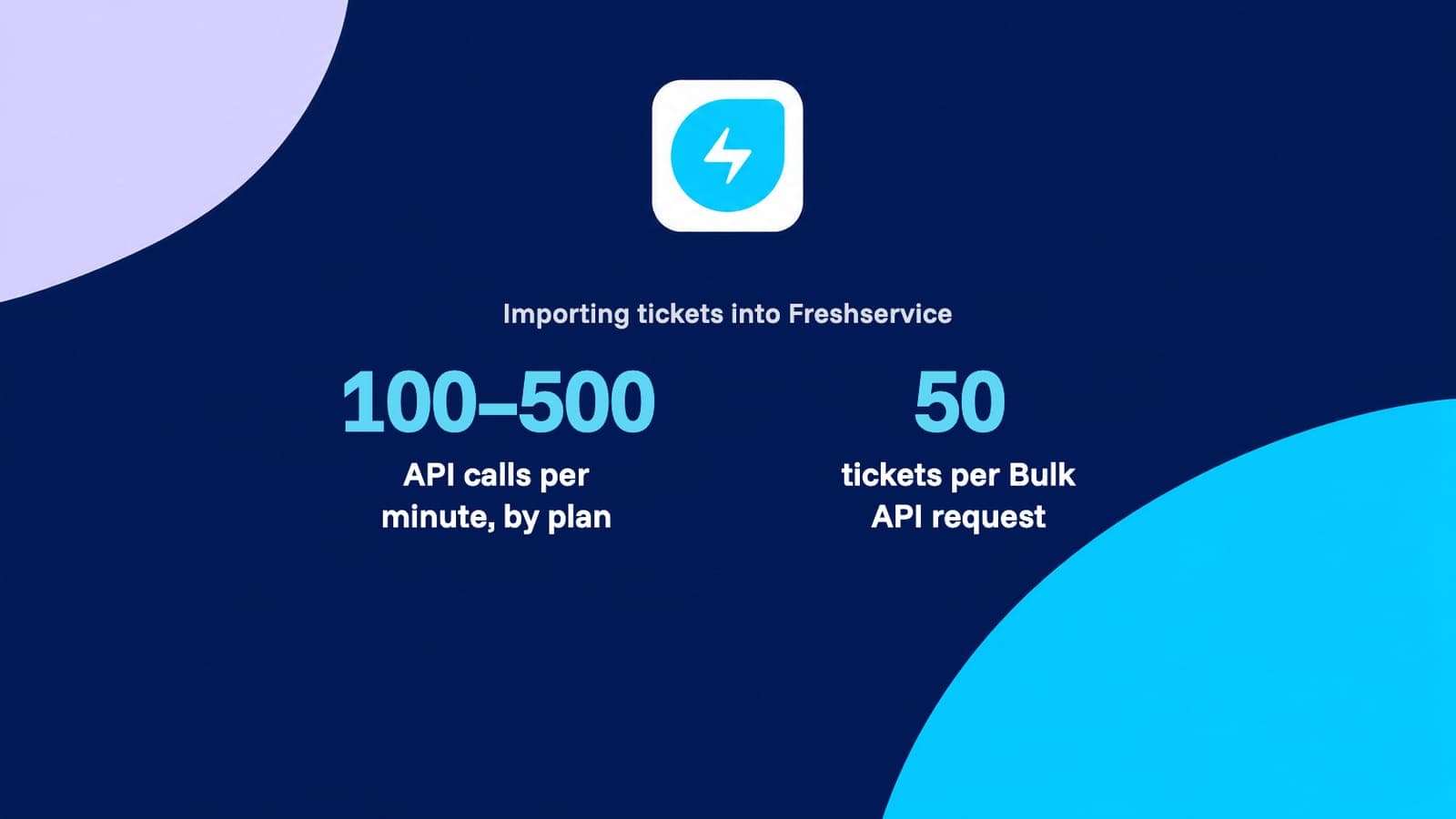
- Freshservice allows 100 API requests a minute on Starter, 200 on Growth, 400 on Pro and 500 on Enterprise, counted across the whole account, and caps Create Ticket at 50, 80, 140 and 160 a minute.
Source: Freshservice API documentation, checked 15 Nov 2026
- Importing into Freshservice: 40 MB for every file on a ticket
- Freshservice counts the ticket and all of its notes together: the attachments on one ticket cannot add up to more than 40 MB.
Source: Freshservice API documentation, checked 15 Nov 2026
- Importing into Freshservice: notes keep their author
- A Freshservice note can be written on behalf of another agent or requester through user_id, and Freshservice creates every note as private unless private is set to false.
Source: Freshservice API documentation, checked 15 Nov 2026
- Importing into Freshservice: two routes in, incidents and requests
- The Freshservice Tickets API takes only the incident type. A service request is placed on a service catalog item through place_request, raised for the requester named in its email attribute.
Source: Freshservice API documentation, checked 15 Nov 2026
- Importing into Freshservice: articles need a folder, folders a category
- Freshservice solutions are split into categories, folders and articles. A folder must name its category_id, an article must name its folder_id, and each article is saved as a draft or as published.
Source: Freshservice API documentation, checked 15 Nov 2026
Facts checked 15 Nov 2026 against Zendesk and Freshservice documentation. Each fact links its source.
Zendesk to Freshservice questions
Still unsure? Ask the engineer who would run this migration, not a sales rep.
Can we move from Zendesk to Freshservice without losing ticket history?
Yes, every ticket moves with its full thread. Public comments become replies and internal notes become private notes, in their original order, with attachments on the note they came with. Archived Zendesk tickets are read through the incremental export, and the reconciliation report counts tickets on both sides by status, brand and year.
Will Zendesk internal notes stay private in Freshservice?
Yes. Each Zendesk comment with public set to false is written to Freshservice as a private note, which requesters cannot see. Freshservice creates notes as private unless told otherwise, and we set the flag on every note rather than rely on that default. Your team checks the sample logged in as a requester.
Do original ticket dates survive the move into Freshservice?
Yes, in dedicated date fields. The Freshservice API documents no way to write created_at or updated_at, so the original Zendesk created, updated and solved dates go into custom date fields that reports can use, and each note opens with its original time. The Zendesk ticket id is kept in a searchable field.
What happens to Zendesk tickets that have already been archived?
They move like any other ticket. Zendesk archives tickets 120 days after they close and hides them from Listing Tickets, so MigrateX reads the whole account through the incremental export, which includes them. Archived and active tickets are counted separately in the reconciliation report.
Which Zendesk tickets should become service requests rather than incidents?
Tickets raised through forms that ask for something, such as access, hardware or onboarding, are usually service requests. The Freshservice Tickets API takes incidents only, so requests are placed on catalog items your admin builds first. Closed request history can also stay as incidents with a tag, which needs no catalog item.
What happens to attachments larger than Freshservice allows on one ticket?
They are linked instead of attached. Freshservice allows 40 MB for every file on a ticket combined, while Zendesk takes single inbound files of up to 50 MB. Files that would cross the limit go to storage you own, and a private note on the ticket lists each one with its filename, size and link.
Will requesters get emails from Freshservice while the history is loading?
Not if notifications are off first. Because Freshservice warns that API migrations trigger a large number of emails, your Freshservice admin switches off requester notifications and Workflow Automator rules before the bulk pass, and the free sample proves no requester is emailed.
Can several Zendesk brands go into separate Freshservice workspaces?
Yes, on Freshservice accounts that have workspaces. Each brand is mapped to a workspace on the scoping call and the workspace is set on every ticket as it is created, because Freshservice does not let Update change it later. Without workspaces, the brand is kept in a custom field you can filter on.
Do Help Center articles move into the Freshservice knowledge base?
Yes. Help Center categories become solution categories, sections become folders and articles become solution articles, published or draft as they were. Freshservice needs every article inside a folder, so the structure is created before the articles. Article URLs change, so links to old Help Center pages need redirecting.
What does a Zendesk to Freshservice migration cost?
The price follows ticket and comment volume, files per ticket, the number of brands, how many forms become service requests and the size of your Help Center. MigrateX first migrates 100 of your records as a free sample, then sends a fixed quote within 24 hours of the scoping call.
How it compares
Four ways to run Zendesk to Freshservice
The same data, moved four different ways. This is what changes between them.
Object coverage (incidents, problems, changes, requests, KB)
MigrateX
Every object in the mapping on this page, plus the ones you ask for during scoping.
Automated migration software
Tickets and contacts are covered. Problems, changes and request items often are not.
Vendor CSV import
One object per file, and only the fields the export template exposes.
In-house scripts
Whatever you have time to build before the cutover date.
Work notes vs comments fidelity
MigrateX
Each entry is posted separately, private stays private, public stays public.
Automated migration software
Threads usually arrive, but per-entry author and visibility can be flattened.
Vendor CSV import
Notes collapse into one field on the ticket, if they come across at all.
In-house scripts
Possible, but it is the part teams most often run out of time for.
Attachments
MigrateX
Uploaded against the right note, and re-hosted with a link when they exceed the Freshservice cap.
Automated migration software
Supported up to the destination cap. Oversize files are skipped.
Vendor CSV import
Not carried by a CSV import.
In-house scripts
Needs its own download, retry and upload pipeline.
Original IDs cross-referenced
MigrateX
Every source id is stored on the destination record and handed back as a map.
Automated migration software
Often kept as a tag or a single text field.
Vendor CSV import
Lost once the file is imported.
In-house scripts
Only if you design the mapping table up front.
Delta sync before cutover
MigrateX
Included. Anything created or changed during the bulk pass is synced at cutover.
Automated migration software
Usually a paid upgrade on the top tier.
Vendor CSV import
You would re-export and re-import by hand.
In-house scripts
Requires change tracking and idempotent writes on both sides.
Rate-limit handling
MigrateX
Paced to your plan limits, honours Retry-After, and resumes from a checkpoint.
Automated migration software
Backs off, but a long run can still stall and leave partial records.
Vendor CSV import
Not applicable, and the file size limits bite instead.
In-house scripts
The most common reason a home-grown run dies overnight.
Validation report
MigrateX
Counts per object and per status on both sides, with every default and placeholder listed.
Automated migration software
A run log and an error list, rather than a reconciliation.
Vendor CSV import
Row counts in a spreadsheet.
In-house scripts
You write the reconciliation queries yourself.
Rollback plan
MigrateX
Every write is tagged, so a batch can be reversed without touching your own records.
Automated migration software
Some approaches can clear a migration, some cannot.
Vendor CSV import
Manual cleanup of everything the import created.
In-house scripts
Only if you built the tagging in from the start.
Who does the work
MigrateX
A MigrateX engineer runs it and stays on the cutover call.
Automated migration software
You run the software. Support answers tickets.
Vendor CSV import
Your admins, one file at a time.
In-house scripts
Your engineers, instead of your roadmap.
Guides
Guides for a Zendesk to Freshservice migration


Related routes
Other routes we run






Built for your security review, from the first call.
Read how we handle your dataSOC 2 Type II
Independently audited controls over how we handle your data.
GDPR compliant
Data processing agreement available.
HIPAA compliant
Business associate agreement available.

Start your Freshservice move with 100 of your records.
Scope my migrationFree sample migration of 100 of your records, plus a fixed quote within 24 hours.