

Methodology: built from Zendesk Help Center articles, Zendesk developer documentation and Zendesk's data deletion policy, all checked on 1 Oct 2026. No vendor reviewed or paid for this article. We did not run hands-on tests.
A Zendesk data migration starts with getting everything out intact: tickets with every public reply and internal note, users and organizations, attachments, Help Center articles and audit history. Zendesk's built-in exports cover only part of that, so a complete extraction also uses the API. Triggers, automations, macros, views and SLA policies do not move as data. They are rebuilt on the target.
This guide is for IT and support operations teams leaving Zendesk for an ITSM platform. It covers the source side: each export route Zendesk documents, what it misses, the limits that set your pace, and when Zendesk deletes your data after you cancel.
Key takeaways
- Zendesk's data exports (JSON, CSV, XML) are not available on Team plans, and must be enabled on request by Zendesk Customer Support (Zendesk, as of 1 Oct 2026).
- CSV exports leave out comments, and JSON exports drop the comments of any ticket with more than 1 MB of data (Zendesk, as of 1 Oct 2026).
- Zendesk says Support has no full download or export for attachments (Zendesk, as of 1 Oct 2026).
- When you cancel, you lose access to your data, and automated deletion begins after 90 days (Zendesk, as of 1 Oct 2026).
Why teams leave Zendesk for an ITSM platform
Teams usually move when IT needs problem and change management, or support consolidates onto the company's main platform. Atlassian launched Service Collection on 7 Oct 2025, bundling Jira Service Management with Customer Service Management, "built for external customer support" (Atlassian, as of 1 Oct 2026). Freshservice includes problem and change management from its Pro plan, at $99 per agent per month billed annually (Freshworks, as of 1 Oct 2026).
Our Zendesk vs Freshservice comparison covers when IT outgrows a support desk, and our Zendesk vs Jira Service Management comparison covers the Atlassian route. Whatever the target, your source-side deadline is the Zendesk renewal date.
Before you start: scope your Zendesk data migration
Get exports enabled. Zendesk's export tools are available on Suite Growth, Professional, Enterprise and Enterprise Plus, and on Support Professional and Enterprise. They are off by default until the account owner asks Zendesk Customer Support to turn them on. Team plans don't get them, though every plan can export through the REST API (Zendesk, as of 1 Oct 2026).
Record your rate limits. Zendesk allows 200 Support API requests per minute on Team, 400 on Growth and Professional, 700 on Enterprise and 2,500 on Enterprise Plus; incremental exports get 10 per minute, or 30 with the High Volume add-on (Zendesk developer docs, as of 1 Oct 2026).
Check what deletes data. Deleted tickets are permanently deleted after 30 days in the Deleted tickets view (Zendesk, as of 1 Oct 2026). Ticket deletion schedules remove archived tickets automatically, and those can't be restored (Zendesk, as of 1 Oct 2026). Agree with your data protection owner which stay on.
Count everything. Record counts per object and status, archived tickets included, from comments and side conversations to attachments, users and Help Center articles. List business rules and SLA policies separately as your rebuild list. See how to audit legacy help desk data before a migration.
Know your load side. For loading, see our Zendesk to Jira migration guide, importing tickets into Freshservice, or our ServiceNow migration guide.
Zendesk export options compared: how to export tickets and the rest
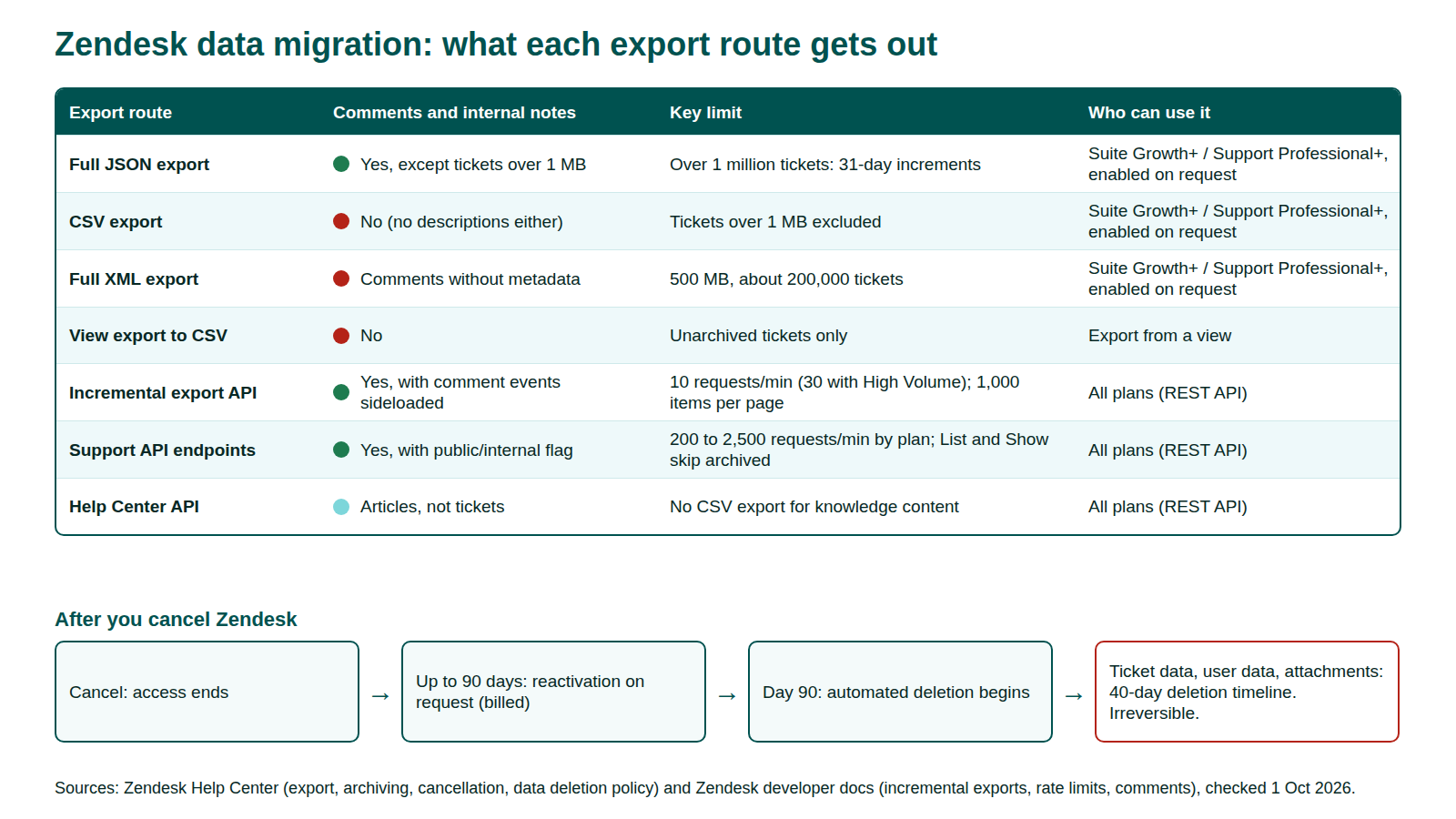
No single Zendesk export route returns everything.
| Export route | Includes | Misses or limits | Source |
|---|---|---|---|
| Full JSON export | Tickets with comments, users, organizations, attachment links | No comments on tickets over 1 MB; skips items stamped within 6 minutes of the request; over 1 million tickets arrive in 31-day increments | Zendesk, as of 1 Oct 2026; Zendesk attachments, as of 1 Oct 2026 |
| CSV export | Ticket field data | No comments, descriptions or deleted tickets; tickets over 1 MB excluded; some custom field types dropped | Zendesk, as of 1 Oct 2026 |
| Full XML and user XML export | Accounts, groups, organizations, tickets, users | 500 MB maximum (about 200,000 tickets); no custom ticket, user or organization fields; no comment metadata | Zendesk, as of 1 Oct 2026 |
| View export to CSV | Columns shown in a view | Unarchived tickets only; no comments | Zendesk, as of 1 Oct 2026 |
| Incremental export API | Tickets, ticket events with comments, users, organizations, articles; 1,000 items per page | 10 requests per minute (30 with High Volume) | Zendesk developer docs, as of 1 Oct 2026 |
| Support API endpoints | Comments with public/internal flag, audits, side conversations, attachments, ratings | 200 to 2,500 requests per minute by plan; List Tickets and Show Ticket skip archived tickets | Zendesk rate limits; Zendesk Tickets API, as of 1 Oct 2026 |
| Help Center API | Articles per locale; attachments on a separate endpoint | No CSV export for knowledge content | Zendesk; Help Center API, as of 1 Oct 2026 |
File exports suit counts, spot checks and an archive copy. A complete extraction, with every comment, audit and attachment, runs on the API.
What exports as data and what doesn't
Records export as data. Configuration is rebuilt.
| Exports as data | Rebuilt on the target (not migrated) | At risk during extraction |
|---|---|---|
| Tickets: status, priority, type, tags, custom fields | Triggers and automations | Archived tickets missed by list endpoints |
| Public replies and internal notes, with author, timestamp and public flag | Macros | Comments absent from CSV or dropped from JSON |
| Attachments and inline images | Views | Private attachment URLs that expire |
| Ticket audits (change history) | SLA policies and running SLA timers | Deleted tickets purged mid-project |
| Side conversations | Explore reports and dashboards | Side conversations, stored apart from comments |
| Users, organizations, groups, memberships | Custom agent roles | Passwords, which the API can't read |
| Help Center articles, translations, attachments | Help Center theme | Article images missing from HTML-only backups |
| Satisfaction ratings, ticket metrics | (none) | Legacy and newer CSAT on different endpoints |
Zendesk SLA policies combine seven metrics, from first reply time to total resolution time (Zendesk developer docs, as of 1 Oct 2026). Neither the definitions nor running timers move. Keep outcomes as data: ticket metrics hold reply, resolution and wait times, though their list endpoint excludes archived tickets (Zendesk developer docs, as of 1 Oct 2026). That is what data fidelity in a migration means in practice.
Tickets, comments and public vs private notes
Each Zendesk comment carries a public flag: true for a public reply, false for an internal note. The comments endpoint returns up to 100 comments per page with author, timestamp and HTML body (Zendesk developer docs, as of 1 Oct 2026). Keep that flag intact, because internal notes often hold personal data. In bulk, the ticket events incremental export returns full comments only when you sideload them (Zendesk developer docs, as of 1 Oct 2026).
Archived tickets
Zendesk archives most tickets 120 days after they reach Closed, and archived tickets stay reachable through search, most API endpoints, incremental exports and full data exports (Zendesk, as of 1 Oct 2026). List Tickets and Show Ticket don't return them (Zendesk developer docs, as of 1 Oct 2026). Neither does the account-wide audit list, though the per-ticket audit endpoint does (Zendesk developer docs, as of 1 Oct 2026). Reconcile archived counts separately.
Audits, side conversations and satisfaction ratings
Audits are Zendesk's read-only history of every ticket update (Zendesk developer docs, as of 1 Oct 2026). Status changes and reassignments live there, not in comments.
Side conversations are separate objects listed per ticket, with messages recorded as events (Zendesk developer docs, as of 1 Oct 2026). A comments-only extraction misses them.
Satisfaction data sits in two places. The Satisfaction Ratings endpoint, which Zendesk labels legacy CSAT, returns scores and comments (Zendesk developer docs, as of 1 Oct 2026). Newer CSAT survey responses have their own endpoint (Zendesk developer docs, as of 1 Oct 2026). Extract both, or trend reports break. Carry each Zendesk ticket ID into a field on the target for old references.
Users, organizations and groups
Zendesk users are end users, agents or admins, with custom agent roles on Enterprise. A user can belong to several organizations through organization memberships, and hold several identities, such as two email addresses. Passwords are not readable through the API (Zendesk developer docs, as of 1 Oct 2026).
Extract memberships and identities with each user, or requesters land in the wrong organization. Plan single sign-on or password resets on the target, and map groups to assignment groups.
Attachments, Help Center articles and relationships
Attachments and inline images
Zendesk says Support has no full download or export for attachments. You fetch each file from the link on its comment or in a JSON export (Zendesk, as of 1 Oct 2026). Inline images appear as attachments only when you list comments with inline images included (Zendesk developer docs, as of 1 Oct 2026).
With private attachments on, agents must sign in to view files (Zendesk, as of 1 Oct 2026). For accounts created after 5 Dec 2024, or using messaging, private attachments use temporary URLs that must be downloaded right away (Zendesk, as of 1 Oct 2026). Store every file during extraction, and count files per ticket at both ends to prevent a lost-attachment flood at cutover.
Help Center articles
There is no CSV export for knowledge content, so articles come out through the Help Center API (Zendesk, as of 1 Oct 2026). Article attachments sit on a separate endpoint, split into inline images and block attachments of up to 20 MB each (Zendesk developer docs, as of 1 Oct 2026). Zendesk's own backup tutorial saves article HTML per locale and leaves images out of scope (Zendesk developer docs, as of 1 Oct 2026), so download images separately.
Links between records
Incidents point to their problem ticket through a problem ID, and follow-up tickets keep a link to the closed ticket they came from (Zendesk developer docs, as of 1 Oct 2026). Export each relationship as a pair of source IDs and recreate it as a real link on the target. Flattened into text, it stops working.
Macros, triggers, automations and SLA policies are rebuilt, not migrated
Business rules are configuration. They are rebuilt in the target's own rule engine, and running SLA timers start fresh there.
Export the definitions anyway as a rebuild spec. The API lists triggers with conditions and actions (Zendesk developer docs, as of 1 Oct 2026), macros including agents' personal ones (Zendesk developer docs, as of 1 Oct 2026), and SLA policies with targets per priority (Zendesk developer docs, as of 1 Oct 2026). Triggers reference account-specific field and group IDs, so translate those into names for the build team.
The Zendesk data migration plan in phases
A Zendesk data migration runs as a controlled change in six phases, each with a go/no-go gate. Our ITSM migration guide and ServiceNow to Jira migration plan use the same model.
- Discover. Get exports enabled, record rate limits, run the inventory, check deletion schedules.
- Map. Map forms, statuses, priorities, fields, users and comment visibility. Configure the target before data arrives.
- Test migration. Load a slice with archived tickets, very large tickets, long threads, private attachments, side conversations and internal notes.
- Cutover with delta sync. Load history in advance, freeze Zendesk, then run an incremental export from your last cursor, with a start time at least one minute in the past (Zendesk developer docs, as of 1 Oct 2026).
- Reconcile. Compare counts per object and status, plus comments and attachments per ticket. Check internal notes from a customer account.
- Hypercare. Watch new tickets, rebuilt rules and SLA goals. Keep Zendesk read-only until audit and reporting owners sign off.
Keep a read-only archive before you cancel
Don't cancel Zendesk on go-live day. Once you cancel, you lose access. Within 90 days the account owner can request reactivation, billed from cancellation, and after 90 days automated deletion begins (Zendesk, as of 1 Oct 2026). Zendesk's deletion policy then lists a 40-day timeline for ticket data, user data and attachments, and says the process cannot be reversed (Zendesk, as of 1 Oct 2026). Keep the subscription through hypercare and take a final export, attachments included, as an archive you own.
Common failure points in a Zendesk migration
Each comes from documented Zendesk behavior, so a test migration can catch it. See also why automated migration scripts fail.
| Failure point | Why it happens | How to catch it |
|---|---|---|
| Comments missing | CSV has none; JSON drops them on large tickets | Compare comment counts per ticket |
| Archived tickets missing | List endpoints skip them | Reconcile archived counts separately |
| Internal notes made public | Public flag lost in transit | Open migrated tickets as a customer |
| Broken attachments | Sign-in required or expired URLs | Compare files and bytes per ticket |
| Data deleted mid-project | Deleted-ticket purge or deletion schedule | Review schedules in Discover |
| Missing article images | HTML-only knowledge base backup | Check images on migrated articles |
| Users can't sign in | Passwords can't be exported | Test SSO or resets with real accounts |
Zendesk data migration checklist
For the target side, use our ITSM migration checklist.
- Ask Zendesk Customer Support to enable data exports.
- Record your Support API and incremental export rate limits.
- Review deleted-ticket and deletion-schedule settings.
- Count every object per status, archived tickets included.
- Agree the history scope with audit and reporting owners.
- Export business rule and SLA definitions as the rebuild spec.
- Extract comments with their public flag, plus audits and side conversations.
- Extract legacy satisfaction ratings and CSAT survey responses.
- Extract users with memberships and identities.
- Download every attachment and Help Center image.
- Export relationships as ID pairs.
- Run a test migration and reconcile it.
- Plan the freeze window and delta pass.
- Take a final archive export; cancel only after hypercare sign-off.
FAQ
Methodology
We built this guide from Zendesk Help Center articles, Zendesk developer documentation and Zendesk's Service Data Deletion Policy, all checked on 1 Oct 2026. Help Center articles were read through Zendesk's Help Center API. We read ranking pages for gaps but do not cite them. We did not run hands-on tests.
Disclosure: MigrateX, the publisher of this article, runs ITSM data migrations, including between platforms named here. No vendor reviewed or paid for this article.